July was the month EventCatalog v4 landed. Systems and context maps, custom pages and API routes, message trigger paths, scoped MCP servers, custom properties, and a lot of polish underneath.
Welcome to the monthly update for EventCatalog. July was our biggest release month so far. We shipped EventCatalog v4, and then kept shipping on top of it, moving from 4.0.0 all the way to 4.3.4 by the end of the month.
The theme was one we have been building towards for a while: EventCatalog is no longer only about documenting events. It is about documenting your software architecture, and giving both your engineers and your AI tools a graph they can actually reason about.
- EventCatalog v4 and systems
- Custom pages and API routes
- Map commands to the events they trigger
- Scoped MCP servers
- Custom properties on resources
- A better Discover experience
- Schema Explorer improvements
- Entities go deeper
- Other project improvements
EventCatalog v4 and systems
EventCatalog started in 2022 as a small open source project for documenting events. More than 40,000 catalogs later, it is clear our community is not only documenting events, they are documenting their software architecture.
EventCatalog v4 is the first release shaped around that. The headline change is systems, a new first-class resource that sits between domains and implementation detail.
- Domains describe a business boundary or bounded context.
- Systems describe a software capability or an external system.
- Resources describe the services, messages, flows, data stores, entities, and diagrams inside that system.
Your Payments domain might contain a Payment Processing System, and that system owns the API, the worker, the events, the data store, the checkout flow, and the entities involved in authorization and capture. It gives teams a natural place to document the thing they actually own, rather than a flat list of services.
Systems also define relationships to other systems and actors, and EventCatalog turns those into system context maps.
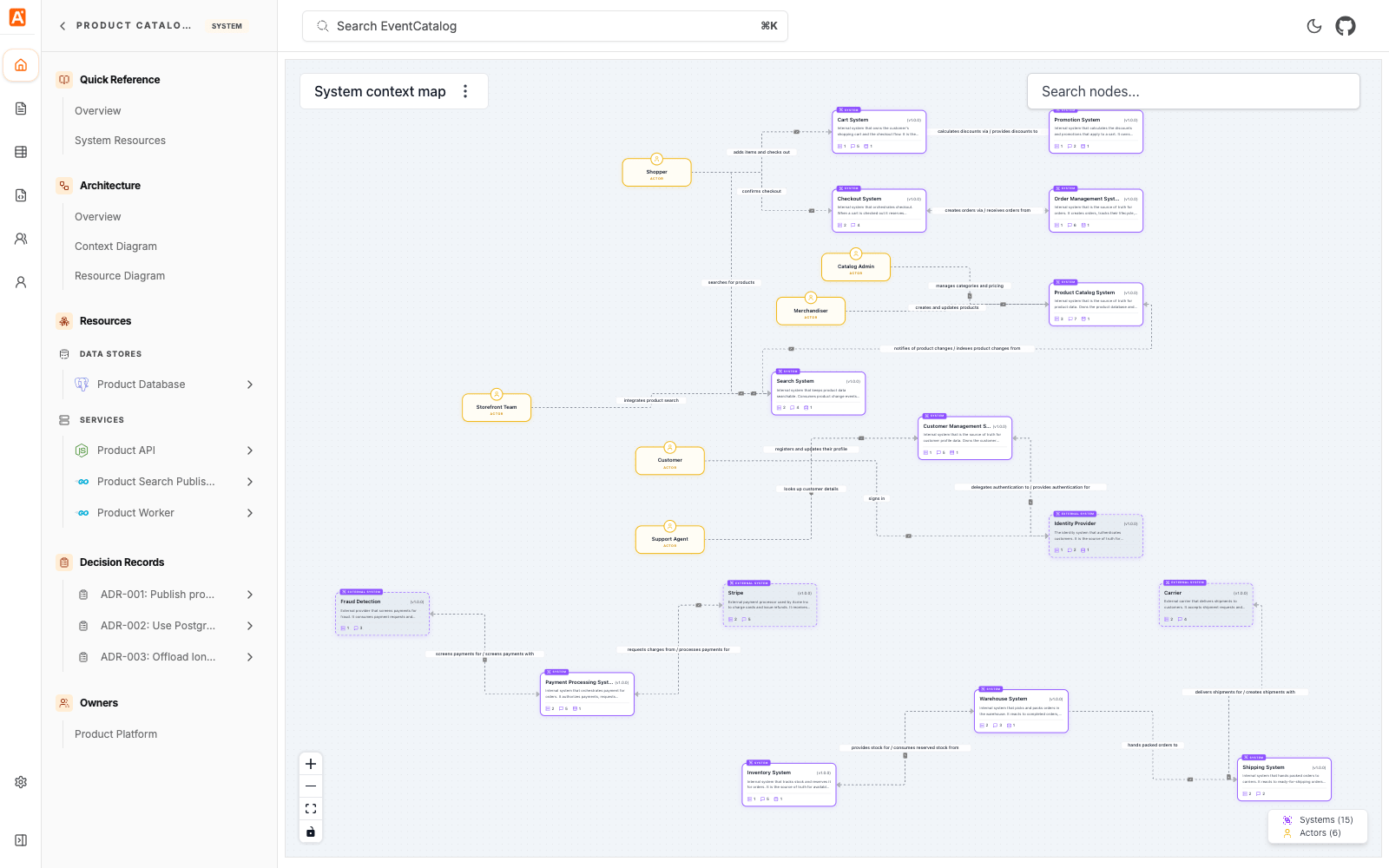
The context diagram answers "how does this system fit into the wider architecture?". Add `
That page is served at `/custom/reports`, and you can add it to the application sidebar with `navigation.groups` so it feels like part of the catalog rather than something bolted on.

<div class="flex justify-center flex-col items-center mb-8">
  <img src="/img/blogs/custom-pages-api-routes-platform-health.png" alt="A custom EventCatalog Platform Health page showing service counts, deployments, incidents, domain readiness, and release checks" class="rounded-lg mb-0" />
  <a href="/docs/development/customization/custom-pages-and-api-routes" class="block p-0 mt-4 text-xs">Read the custom pages docs</a>
</div>

[API routes](/docs/development/customization/custom-pages-and-api-routes/create-an-api-route) live in `pages/api` and give you the server-side half: expose catalog data as JSON, receive a form submission, proxy an internal platform, or pull service health from your observability tool. They need EventCatalog running in server mode.

If you use AI coding agents, there is a `custom-pages-and-apis` skill in our [skills repository](https://github.com/event-catalog/skills) that gives your agent the conventions so you do not have to remember them yourself.

You can read more in the [custom pages release post](/blog/custom-pages-api-routes).

## Map commands to the events they trigger

This one is my favourite from July, and it did not get its own announcement.

Your catalog has always been able to tell you that `OrderService` receives the `CreateOrder` command and produces `OrderCreated` and `OrderRejected`. What it could not tell you is **which of those events came from which command, and under what circumstances**. That relationship lived in someone's head, or in the code.

**EventCatalog 4.2.0 adds a `triggers` property** so you can [map commands to the events they produce](/docs/development/guides/resources/messages/connect-messages/map-commands-to-events).

```md title="/services/OrderService/index.mdx"
---
id: OrderService
version: 1.0.0
name: Order service
receives:
  - id: CreateOrder
    version: 1.0.0
    triggers:
      - id: OrderCreated
        version: 1.0.0
        condition: When payment is authorized and stock is available
      - id: OrderRejected
        version: 1.0.0
        condition: When payment fails or stock is unavailable
---
The optional condition is what makes this genuinely useful. It lets you document the scenario, so a command producing a success event or a failure event, a branch driven by a business rule, or two different paths that happen to produce the same event, are all visible on the page rather than implied.
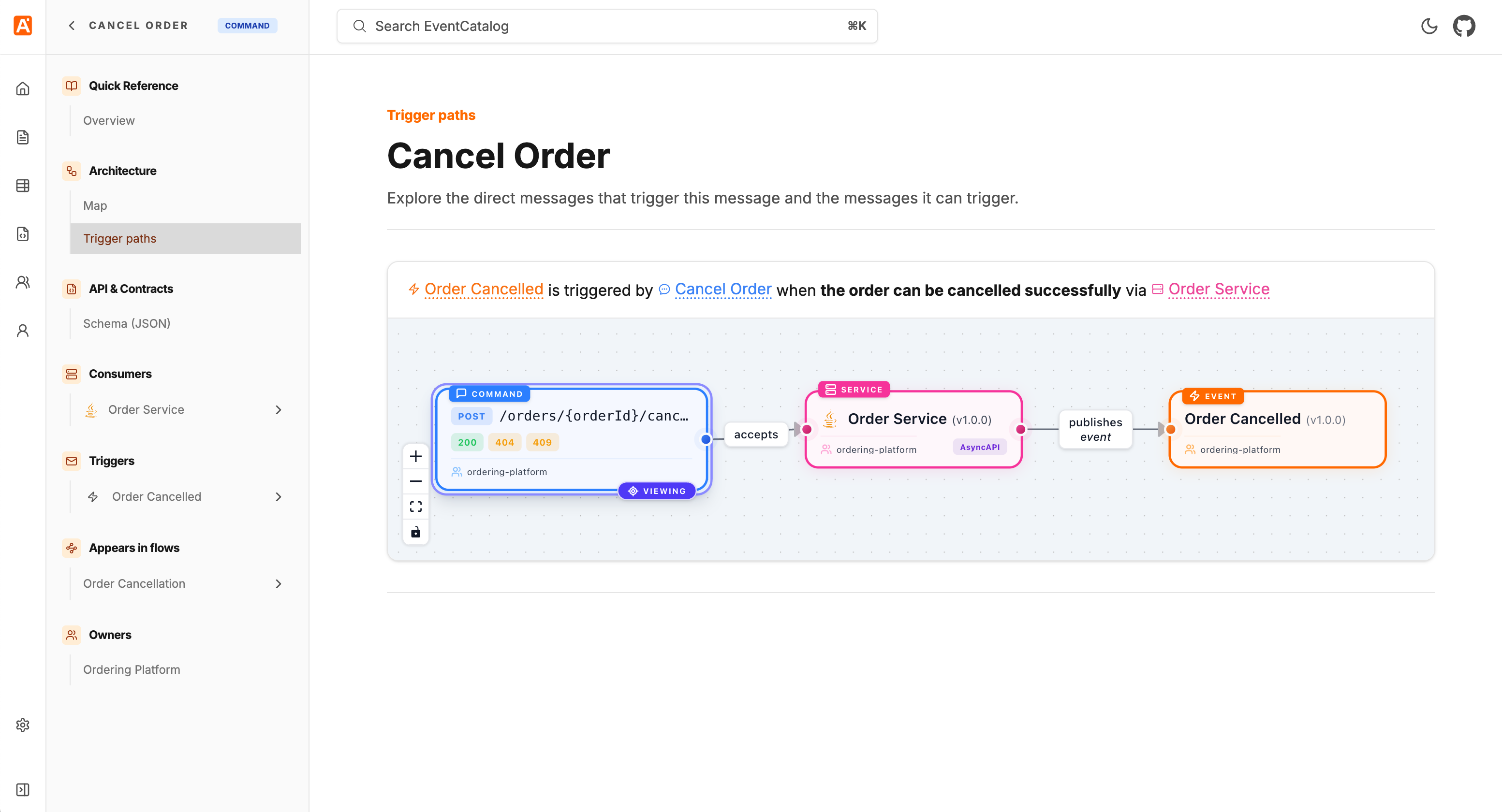
The relationship is bidirectional. Commands list their events under Triggers, and each event page lists the commands that can produce it under Triggered by. Messages that take part in at least one resolved relationship also get a dedicated Map commands to events page, with one visual row per path and its scenarios.
The same release improved the visualiser: the resource you are currently viewing now stays visibly marked as the focus of the graph, context menus let you focus another node in its own map, and edge labels render above edges so intersecting paths no longer hide their text. Trigger pointers are supported in the SDK too.
Scoped MCP servers
More context is not always better context.
Our MCP server already let AI tools query your entire architecture, which is exactly what you want for organization-wide dependency questions. But most engineers spend their day inside a much smaller boundary, and an agent loading Shipping, Identity, and Analytics resources to answer a refunds question just adds noise.
From 4.3.0, EventCatalog exposes a scoped MCP endpoint for every domain and system.
https://your-eventcatalog.com/docs/mcp/domains/payments
https://your-eventcatalog.com/docs/mcp/systems/payment-processing/1.2.0
Your AI tool can now connect at the level that matches the question it needs to answer:
flowchart LR
    Agent[AI tool or agent] --> Catalog[Whole-catalog MCP]
    Agent --> Domain[Domain MCP]
    Agent --> System[System MCP]
    Catalog --> All[Every catalog resource]
    Domain --> DomainGraph[Payments domain and its graph]
    System --> SystemGraph[Payment Processing and its graph]
Open a domain or system page, select Connect to MCP server, and you get a URL for that part of the catalog. The scoped server includes the selected resource and follows its relationships recursively, so the client gets the connected architecture graph including services, messages, schemas, flows, ubiquitous language, and ADRs, without pulling in unrelated parts of the catalog.
Connect a team's tooling to the domain they own once, and engineers stop having to restate boundaries in every prompt. The same release added an mcp.enabled config option if you want to turn the built-in server off entirely.
You can read more in the scoped MCP servers release post.
Custom properties on resources
EventCatalog gives you first-class fields for the common concepts: owners, messages, relationships, schemas, repositories. But every organization has metadata that is specific to its own platform and processes, and until now there was nowhere clean to put it.
4.2.3 adds custom properties. Any top-level frontmatter field prefixed with x- is treated as your own metadata.
---
id: PaymentAPI
name: Payment API
version: 1.0.0
x-operational-tier: 1
x-on-call:
  schedule: payments-primary
  escalation-channel: '#payments-incidents'
---
Values can be strings, numbers, booleans, arrays, or nested objects, and they work on domains, systems, services, agents, messages, channels, flows, containers, entities, data products, diagrams, and ADRs. New <CustomProperties> and <CustomProperty> MDX components render them on the page, so operational tiers, recovery objectives, and on-call schedules can live next to the architecture they describe.
A better Discover experience
Two small changes that make a big difference when your catalog gets large.
Discover table filters now persist in the URL. Searches, filters, and toggles survive a page reload, and more importantly you can share a filtered view as a link rather than telling someone which six filters to click.
Domains also got a type filter for root domains and subdomains, and subdomains now render nested under their parent in the name column. If you use subdomains heavily, the list finally reflects the hierarchy you actually modelled.
Schema Explorer improvements
The Schema Explorer's version comparison used to only show you consecutive-version diffs, which is fine until someone asks "what changed between 1.0.0 and 2.3.0?".
You can now pick any two versions to diff using From/To selectors. We also fixed $ref resolution for remote JSON schemas, so local and remote pointers are inlined properly instead of rendering as unresolved $ref values, and fixed SchemaViewer portal targeting when multiple schemas share the same id on a page.
Entities go deeper
Entities picked up recursive embedded properties in 4.3.2, so you can model nested structures properly rather than flattening them out. You can also opt in to whole-entity relationship targets, embedded properties render in both entity documentation and visualiser nodes, and generated entity maps come out more compact.
Other project improvements
- Custom documentation tools (
getCustomDocs,searchCustomDocs,getCustomDoc) added to AI Chat and the MCP Server, with section-level full-text search (#2670) - New
getGraphAPI in the SDK (#2726) - SDK support for architecture decision records (#2659)
- Linter support for the new system resources (#2665)
create-eventcatalogcan now optionally install EventCatalog Skills when scaffolding a new project (#2688)- Stable, versionless URLs for the latest service's specifications, changelog, and attached documentation (#2740)
- Navigation loading indicator so slower SSR page transitions give feedback instead of appearing unresponsive (#2722)
- Improved sidebar group collapsing, persistence, and resizing (#2743)
- Bumped to Astro 7.1.1 with updated
@astrojsintegrations (#2723) - Fixed: static builds crashing with
TypeError: Missing parameter: idwhentrailingSlash: true(#2690) - Fixed: AI chat API URL not respecting a custom base path (#2682)
- Fixed: cropped and colorless visualiser image exports (#2683)
- Fixed: changelog diffs and raw Markdown endpoints resolving the wrong file paths in SSR deployments (#2712, #2708)
- Fixed: the linter failing to load dependencies from an ESM
eventcatalog.config.js(#2678) - Fixed: sidebar collapse state for ADR status groups (#2731)
- Fixed: proper favicons served instead of the logo image (#2697)
- Removed the EventCatalog DSL import command and Compass playground integration from the CLI (#2738)
Thanks
Thanks to everyone who contributed to EventCatalog this month by opening issues, reporting bugs, and suggesting features, including Benjamin Otto, Alex Dunne, omid eidivandi, Dominik Szczepaniak, Wenzel, Max Dobler, Jan, Christian Johansen, and many more.
Shipping a major version and then iterating on it this fast only works because people tell us what broke.
What's coming in August?
A few things we're working on:
- More improvements to systems, context maps, and the Catalog experience now that v4 is out
- Continued work on EventCatalog Agent and the Code-to-Docs workflow
- More ways to bring catalog context into the tools your teams already use
If you have any questions or want to join our community exploring EventCatalog and event-driven architecture feel free to join us!
Until next time!, Dave