Resource sidebar
eventcatalog@4.10.0Every resource in EventCatalog (domains, services, messages, flows, and more) gets a generated sidebar showing its quick reference, architecture, related resources and owners.
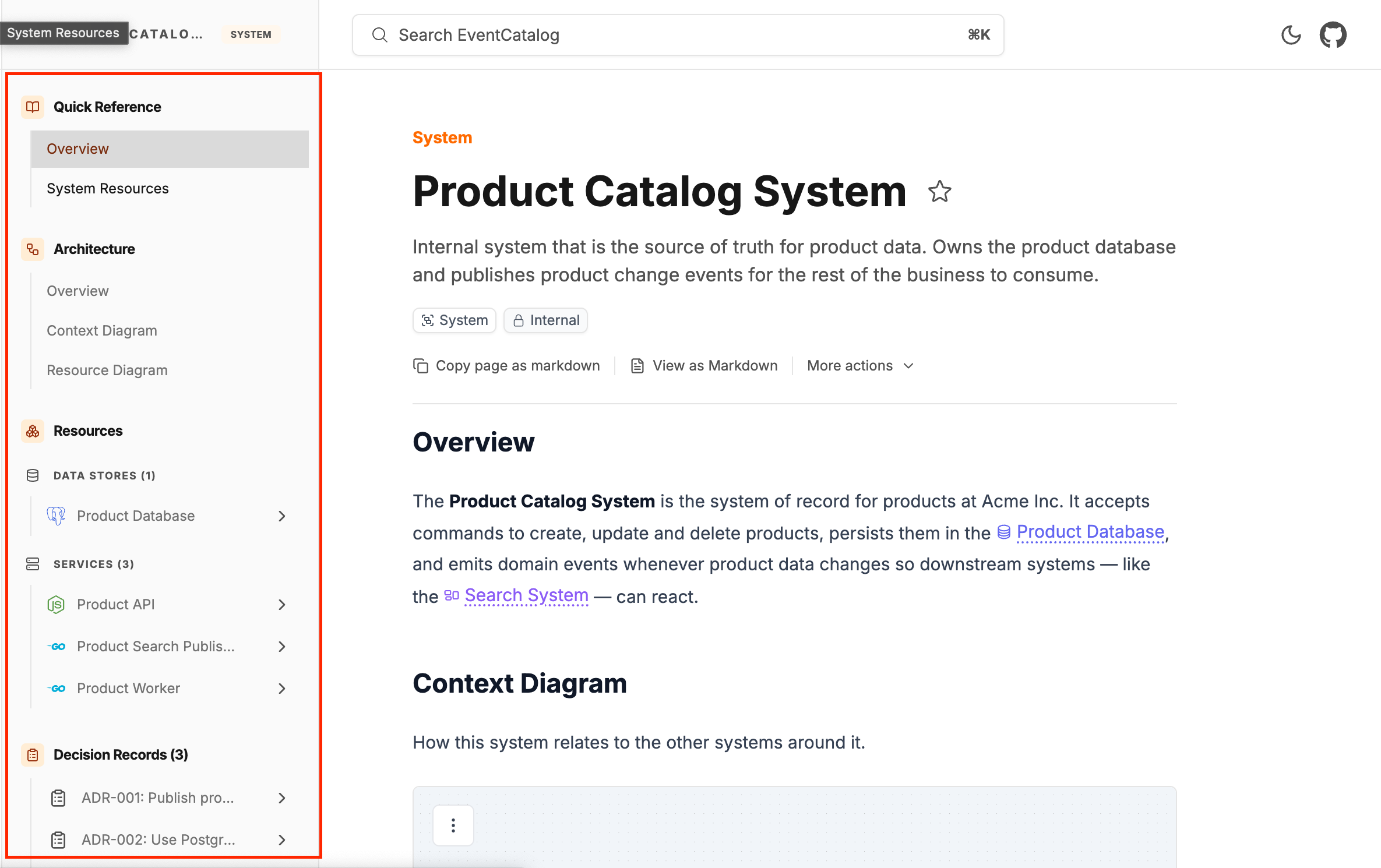
By default, EventCatalog will generate a sidbar for your resources, but sometimes you may want to customize what is shown here — for example runbooks, guides, external links, or your own grouping of events and services.
To do this, add a sidebar.json file next to the resource's index.mdx. This file becomes the sidebar for that resource.
domains/
  Payments/
    index.mdx
    sidebar.json        <-- your sidebar for the Payments domain
When a sidebar.json is present it fully replaces the generated sidebar — what you list is what renders, in the order you list it. Nothing is merged in, and anything you don't list isn't shown. Remove the file to get the default sidebar back.
Which resources support it?
All of them. A sidebar.json can sit next to the index.mdx of any domain, system, service, agent, event, command, query, flow, container (data store), entity, data product or ADR.
Versioned copies (versioned/0.0.1/index.mdx) inherit the resource folder's sidebar.json automatically, unless the versioned folder contains its own.
Quick start
A sidebar is a list of sections. A section is either a predefined $token (a section EventCatalog generates and keeps up to date for you) or a group you define yourself:
{
  "sections": [
    // A predefined section, relabelled from "Quick Reference" to "Overview"
    { "section": "$quick-reference", "title": "Overview" },
    // Your own group — any Lucide icon name works
    {
      "title": "Runbooks",
      "icon": "Siren",
      "pages": [
        // Links to this domain's runbooks/failed-captures documentation page
        "[[doc|runbooks/failed-captures]]",
        // A plain link — external links open in a new tab
        { "title": "Health dashboard", "href": "https://grafana.acme.dev/d/payments" }
      ]
    },
    // Predefined sections, rendered exactly as the default sidebar would
    "$architecture",
    "$services",
    "$owners"
  ]
}
This renders: an Overview section (the generated Quick Reference, relabelled), your own Runbooks group, then the generated Architecture, Services and Owners sections.
Sections
Each entry in sections is one of three shapes:
| Shape | Example | Meaning |
|---|---|---|
| Token | "$architecture" | A predefined section, rendered exactly as the default sidebar would — and kept up to date as your catalog changes |
| Adjusted token | { "section": "$owners", "title": "Team" } | A predefined section with a new title, icon or collapsed state |
| Custom group | { "title": "Runbooks", "icon": "Siren", "pages": [...] } | A group you define. icon is any Lucide icon name |
A predefined section with nothing behind it (for example $entities on a domain with no entities) renders nothing — you can safely list sections that only sometimes have content.
Pages
Inside a custom group, each entry in pages is one of:
| Entry | Example | Renders |
|---|---|---|
| Section token | "$inbound-messages" | The items of a predefined section, spliced into your group — this is how you extend a generated section with your own pages |
| Resource reference | "[[service|payment-api]]" | The resource, with its own expandable nested sidebar, at its latest version. Messages can pin a version: "[[event|payment-captured@1.0.0]]" — other types always reference the latest |
| Documentation reference | "[[doc|guides/onboarding]]" | One of this resource's documentation pages, addressed as <type>/<id> |
| Specification reference | "[[spec|openapi.yml]]" | A specification page, with the OpenAPI/AsyncAPI/GraphQL logo and the spec's name |
| Schema reference | "[[schema|payment-captured]]" | A message's schema page |
| Link | { "title": "Runbook", "href": "https://..." } | A plain link. External links (any protocol) open in a new tab and show an external-link icon |
| Nested group | { "title": "Internal", "collapsed": true, "pages": [...] } | A subsection. Groups nest to any depth |
Resource references accept any resource type: domain, system, service, agent, event, command, query, flow, container, entity, channel, data-product, adr, diagram, team, user.
Specification and schema references
Specifications belong to a resource, so a spec reference names the file — and optionally the resource that owns it:
"[[spec|openapi.yml]]"                              // this resource's own spec
"[[spec|payment-api/openapi.yml]]"                  // another resource's spec, by id
"[[spec|service/payment-api/openapi.yml]]"          // type-qualified
Specifications always come from the owner's latest version.
Schema references point at a message's schema page:
"[[schema|payment-captured]]"                       // latest version
"[[schema|event/payment-captured@1.0.0]]"           // type-qualified and pinned to a version
Extending a generated section
Because a $token inside pages splices in that section's items, extending a generated section is just wrapping it in your own group — placement is list order:
{
  "title": "Quick Reference",
  "icon": "BookOpen",
  "pages": [
    // Splices in the generated Quick Reference items (Overview, Changelog, ...)
    "$quick-reference",
    // ...followed by your own pages
    "[[doc|guides/onboarding]]",
    { "title": "Team Slack", "href": "https://acme.slack.com/archives/payments" }
  ]
}
Link placeholders
Internal links can use {collection}, {id} and {version} placeholders for the resource the sidebar belongs to, so the same file works across versions:
// On the Payments domain v1.0.0 this renders as
// "Visualiser (1.0.0)" -> /visualiser/domains/payments/1.0.0
{ "title": "Visualiser ({version})", "href": "/visualiser/{collection}/{id}/{version}" }
Internal links automatically respect your configured base path.
Collapsing sections
Any object-form section or group accepts "collapsed": true | false as its initial state — users can still toggle it, and their choice is remembered:
// Starts collapsed; users can still expand it and their choice is remembered
{ "title": "Internal commands", "collapsed": true, "pages": ["[[command|refund-payment]]"] }
Without collapsed, groups with more than five items start collapsed and smaller groups start open.
Predefined sections
Tokens shared by most resource types:
$quick-reference · $documentation · $architecture · $diagrams · $decision-records · $owners · $code · $attachments
And per resource type:
| Resource | Tokens |
|---|---|
| Domain | $api-and-contracts $systems $subdomains $resources $services $flows $entities $domain-events $external-events $resource-groups $agents $external-integrations $data-products |
| System | $resources $services $flows $data-stores $entities |
| Service / Agent | $api-and-contracts* $resource-groups $state-and-persistence $entities* $outbound-messages $inbound-messages $channels $flows |
| Event / Command / Query | $api-and-contracts $producers $consumers $triggered-by $triggers $appears-in-flows |
| Flow | $messages $services $agents $subflows $data-stores $data-products |
| Container | $writes $reads $appears-in-flows |
| Data product | $inputs $outputs $data-contracts $appears-in-flows |
| Entity | $domains $services |
| ADR | $applies-to $supersedes $superseded-by $amends $amended-by $related-decisions $decision-makers |
* service only.
Tokens like $services that the default sidebar nests inside a "Resources" umbrella render as top-level sections when you use them directly.
When something doesn't resolve
Mistakes fail fast so your catalog never silently ships a broken sidebar:
- An unknown
$token, or a[[doc|…]],[[spec|…]]or[[schema|…]]reference that doesn't resolve fails the build, with an error naming the file and listing the valid options. - A resource reference (like
[[service|…]]) to something that doesn't exist renders nothing.
A complete example
The demo catalog uses resource sidebars throughout. The Catalog domain's sidebar organizes the domain for its consumers — guides first, then the events other teams integrate with:
{
  "sections": [
    // Generated Quick Reference, relabelled
    { "section": "$quick-reference", "title": "Overview" },
    // The domain's documentation pages, front and center for new consumers
    {
      "title": "Guides",
      "icon": "BookOpen",
      "pages": [
        "[[doc|guides/integrating-with-the-catalog]]",
        "[[doc|guides/product-data-model]]",
        "[[doc|guides/event-versioning]]"
      ]
    },
    // A curated list of the events other teams subscribe to.
    // Each renders with its own expandable nested sidebar.
    {
      "title": "Integration Events",
      "icon": "Radio",
      "pages": ["[[event|product-created]]", "[[event|product-updated]]", "[[event|product-deleted]]"]
    },
    // Generated sections — kept up to date as the catalog changes
    "$architecture",
    "$systems",
    "$entities",
    // Docs mixed with external links in one group
    {
      "title": "Runbooks",
      "icon": "Siren",
      "pages": [
        "[[doc|runbooks/on-call]]",
        "[[doc|runbooks/search-index-lag]]",
        { "title": "Health dashboard", "href": "https://grafana.acme.dev/d/catalog-overview" }
      ]
    },
    // Out of the way until needed
    { "title": "Decisions", "icon": "ClipboardList", "collapsed": true, "pages": ["[[adr|adr-001-use-transactional-outbox]]"] },
    "$owners"
  ]
}