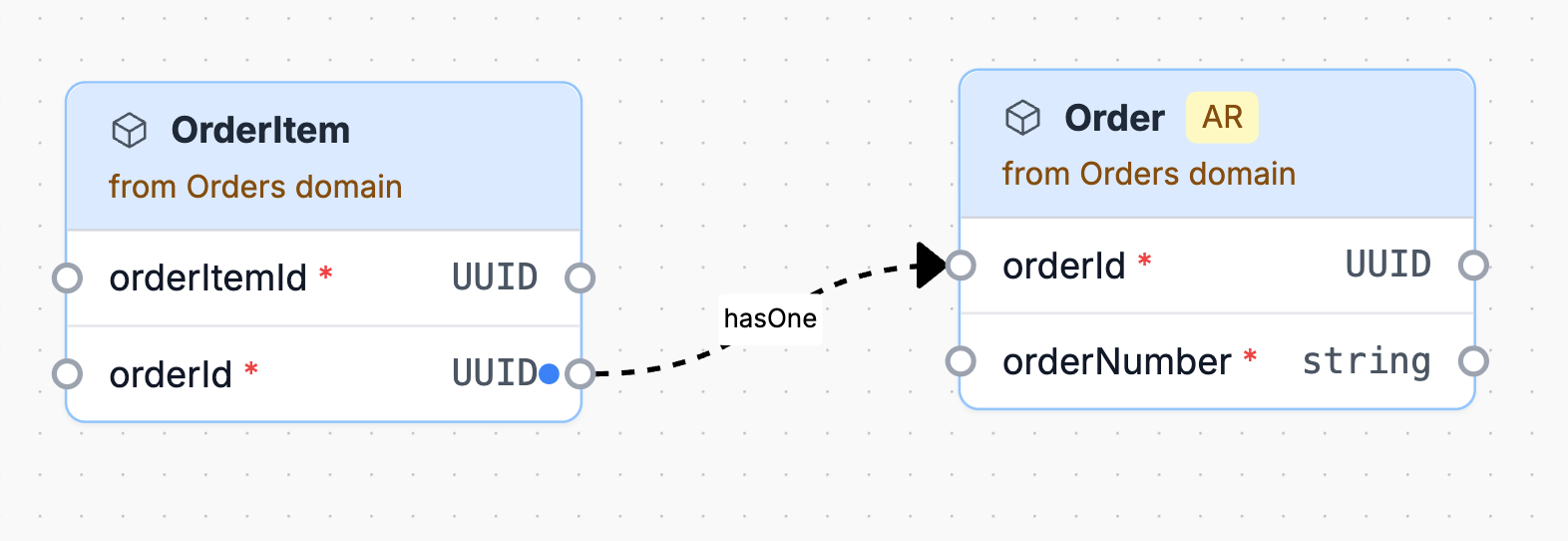
Model entity relationships
Entity relationships are defined on entity properties.
Use relationships when one entity property identifies or points to another entity. For example, an Order might have a customerId property that references Customer, and an OrderItem might have an orderId property that references Order.
Relationship fields
Use these fields on an entity property:
references: The id of the entity being referenced.referencesIdentifier: The property on the referenced entity that this property matches.referenceTarget: Set toentitywhen the relationship should point to the referenced entity as a whole.relationType: The relationship label, such asbelongsTo,hasOne,hasMany, or a business-specific label.
referenceTarget is opt-in. When it is omitted, EventCatalog retains the existing behavior of targeting referencesIdentifier, the referenced entity's identifier, or its first property.
Example relationship
---
# Unique identifier for the entity. Used in URLs and resource references.
id: order
# Friendly display name shown in EventCatalog.
name: Order
# Version of this entity documentation.
version: 1.0.0
# The property that uniquely identifies this entity.
identifier: orderId
# Properties that describe the shape of the entity.
properties:
  # Unique identifier for this order.
  - name: orderId
    # Data type for the property.
    type: string
    # Whether this property is required.
    required: true
  # Identifier for the customer that placed the order.
  - name: customerId
    # Data type for the property.
    type: string
    # Whether this property is required.
    required: true
    # Human-readable description of what the property represents.
    description: Customer that placed the order.
    # Entity this property references.
    references: customer
    # Label used to describe the relationship in entity maps.
    relationType: placedBy
    # Identifier property on the referenced entity.
    referencesIdentifier: customerId
---
This tells EventCatalog that order.customerId references the customer.customerId identifier.
Reference a whole entity
Use referenceTarget: entity when a property relates to the referenced entity as a whole rather than one of its properties.
properties:
  - name: customer
    type: Customer
    references: customer
    referenceTarget: entity
    relationType: placedBy
This renders the relationship against the Customer entity header in entity maps. Existing relationships that omit referenceTarget continue to use property-level targeting.
Model embedded objects
Use nested properties for a value object that exists only as part of its parent entity. Property definitions are recursive, so embedded objects can contain other embedded objects.
properties:
  - name: deliveryAddress
    type: object
    required: true
    properties:
      - name: line1
        type: string
        required: true
      - name: city
        type: string
        required: true
      - name: coordinates
        type: object
        properties:
          - name: latitude
            type: number
          - name: longitude
            type: number
Embedded objects are owned by their parent entity. They have no entity id and cannot be referenced independently elsewhere in the catalog.
Model arrays of embedded objects
Define nested properties inside items when an array contains embedded objects.
properties:
  - name: adjustments
    type: array
    description: Discounts and credits applied to the order.
    items:
      type: object
      properties:
        - name: reason
          type: string
        - name: amount
          type: decimal
          required: true
Embedded properties appear inside their parent entity rather than as separate nodes in entity maps.
Relationship direction
Define the relationship where the reference exists.
If Order has a customerId, define the relationship on the customerId property in Order. You do not need to add the inverse relationship to Customer unless that relationship is useful to document explicitly.
Keep relationship labels useful
Use relationship labels that help readers understand the business model.
Good examples include:
placedBybelongsTocontainspaysForshipsTo
Avoid labels that only repeat implementation detail, such as foreignKey.
Visual output
When entities are attached to a domain or service, EventCatalog can use these relationships to generate an entity map.