Adding data stores to agents
eventcatalog@3.41.0Data stores are containers that hold data in your architecture — databases, caches, object stores, search indexes, and so on. Agents can read from and write to these containers, and documenting those relationships keeps the full data-access picture visible in the visualiser.
Specify read/write relationships
Add readsFrom or writesTo arrays to your agent's frontmatter. Provide the id of the data store and optionally its version.
---
id: FraudReviewAgent
version: 0.0.1
readsFrom:
  - id: fraud-analytics-db
  - id: ml-model-store
    version: 2.0.0
---
---
id: InventoryRebalancingAgent
version: 0.0.1
readsFrom:
  - id: inventory-readmodel
  - id: inventory-db
writesTo:
  - id: rebalancing-audit-log
---
If no version is provided, EventCatalog uses the latest version of the data store.
Visualize data stores
When data stores are connected to an agent, EventCatalog visualizes the read/write relationships — either via the <NodeGraph /> component on the agent page or through the full-screen visualiser.
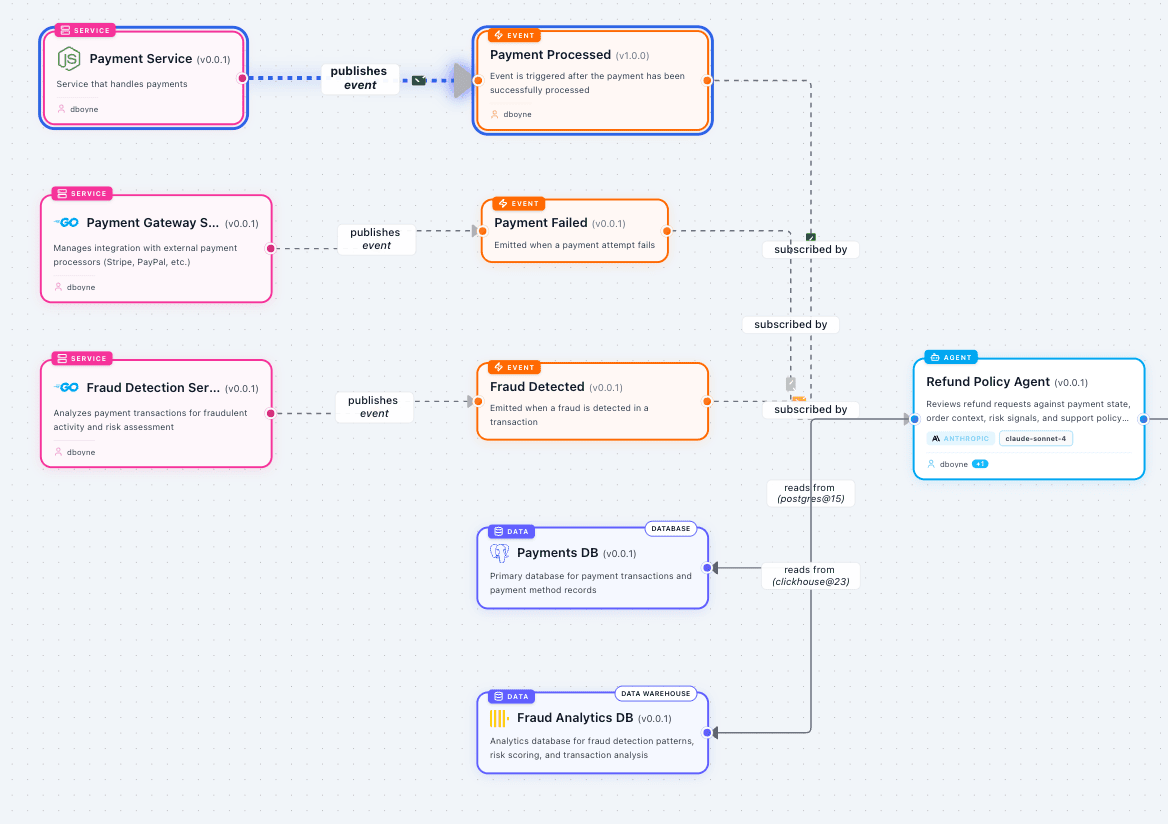
You can also control the Containers section in the agent's sidebar using detailsPanel:
---
id: FraudReviewAgent
version: 0.0.1
detailsPanel:
  containers:
    visible: false
---