Inputs and outputs
eventcatalog@3.8.0Data products consume inputs (e.g events, services, data stores, channels) and produce outputs (e.g events, services, data stores, channels). Defining these relationships helps teams understand data lineage and dependencies.
Defining inputs (input ports)
Inputs represent the source dependencies your data product consumes. In EventCatalog these can be events, commands, queries, services, data stores, or channels.
You need to specify the id of the input and optionally the version of the input. If no version is provided the latest version will be used.
---
id: order-analytics
name: Order Analytics
version: 1.0.0

# Define input dependencies
inputs:
  - id: OrderConfirmed
  - id: PaymentProcessed
  - id: FraudDetectionService
  - id: payment-cache
  - id: payment-domain-eventbus
---
Defining outputs
Outputs represent what your data product produces. These can be events, commands, queries, services, data stores, or channels.
You need to specify the id of the output and optionally the version of the output. If no version is provided the latest version will be used.
---
id: order-analytics
name: Order Analytics
version: 1.0.0

# Define what this data product produces
outputs:
  - id: OrderMetricsCalculated
  - id: NotificationService
  - id: orders-db
  - id: orders-domain-eventbus
---
Visualizing relationships
The <NodeGraph /> component automatically visualizes inputs and outputs.
<NodeGraph />
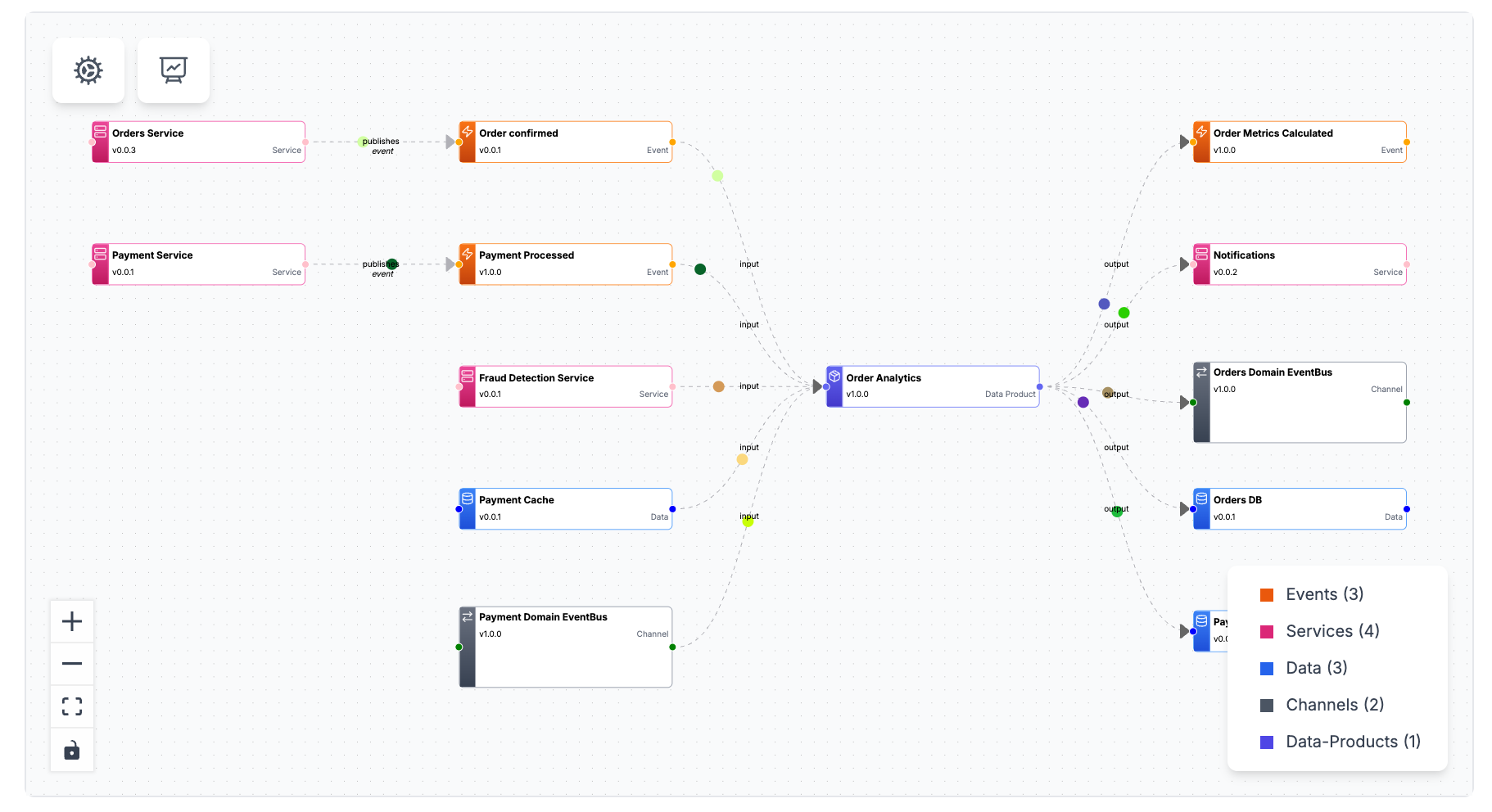
This graph shows:
- Input events flowing into the data product
- Output events or data stores produced
- Services that interact with the data product
- Contract relationships for data stores
Complete example
---
id: payment-analytics
name: Payment Analytics
version: 1.0.0
summary: Payment performance metrics and fraud insights

inputs:
  - id: PaymentInitiated
  - id: PaymentProcessed
  - id: PaymentFailed
  - id: FraudCheckCompleted
  - id: PaymentService
  - id: payments-db

outputs:
  - id: NotificationService
  - id: payment-domain-eventbus
  - id: payment-analytics-db
    contract:
      path: payment-metrics-contract.json
      name: Payment Metrics Contract
      type: json-schema
---

## Overview

Payment Analytics transforms payment lifecycle events into comprehensive metrics.

<NodeGraph />

## Input Events

- **PaymentInitiated** - Start of payment flow (~60k/day)
- **PaymentProcessed** - Successful payments (~55k/day)
- **PaymentFailed** - Failed transactions (~5k/day)
- **FraudCheckCompleted** - Fraud detection results (~60k/day)

## Output Tables

### fact_payments

Transaction-level payment data with fraud scores.

<SchemaViewer file="payment-metrics-contract.json" />