Upgrade to EventCatalog v4
This guide will help you upgrade from v3 to v4 of EventCatalog.
EventCatalog v4 introduces systems as a first-class resource, adds system context maps, updates the Discover and Application sidebar experience, moves EventCatalog onto Astro 7 internally, and removes the PDF export feature.
The v4 branch is currently published as a beta. If v4 has not been promoted to latest yet, install the beta package instead of latest.
Upgrade EventCatalog
Update your project's version of EventCatalog using your package manager:
npm install @eventcatalog/core@latest
If you are testing the v4 beta, use the beta tag:
npm install @eventcatalog/core@beta
Problems upgrading? Try resetting your project.
Before you upgrade
Most v3 catalogs should continue to build without changing their existing resources. You do not need to move your services, messages, flows, entities, or data stores into systems to upgrade to v4.
Before upgrading, we recommend:
- Create a branch for the upgrade.
- Upgrade
@eventcatalog/core. - Remove
.eventcatalog-core,node_modules, and your lock file if the catalog does not pick up the new version. - Run your catalog locally and check custom pages, custom navigation, and visualiser links.
Removed
The following features have now been entirely removed from the code base and can no longer be used.
Removed: Export to PDF
The Export to PDF / print feature has been removed from EventCatalog v4.
What do I need to do?
Remove any user guidance, screenshots, or internal runbooks that tell people to export resource pages to PDF from EventCatalog.
Diagram version comparison is still available, and is no longer gated behind the Scale plan.
Removed: /visualiser/context-map
The old global context map route has been removed.
What do I need to do?
If you have custom navigation, docs, or bookmarks that link to /visualiser/context-map, update them to the new system context map route:
export default {
  navigation: {
    pages: [
      {
        type: 'item',
        title: 'System Context Map',
-       href: '/visualiser/context-map',
+       href: '/visualiser/system-context-map',
      },
    ],
  },
};
Breaking changes
The following changes are considered breaking changes in EventCatalog v4. Breaking changes may or may not affect your catalog depending on how much you customize EventCatalog.
Changed: EventCatalog now uses Astro 7 internally
EventCatalog v4 upgrades the internal application from Astro 6 to Astro 7.
Most catalogs do not need to change anything. If you have custom Astro pages, custom integrations, or custom MDX/Markdown processing that depends on Astro internals, review those customizations during the upgrade.
What do I need to do?
If your catalog only uses EventCatalog resources and MDX content, upgrade EventCatalog and test the catalog.
If you maintain custom Astro pages or custom integrations, check them against Astro 7 behavior and run the catalog locally after upgrading.
Changed: Application sidebar configuration has moved to navigation.groups
EventCatalog v4 removes the top-level sidebar configuration that only let you show or hide items in the Application sidebar.
You can now configure the whole Application sidebar using navigation.groups. This lets you define groups, labels, item order, icons, custom links, bottom-positioned groups, active route matching, and visibility.
navigation.pages still controls the context-aware documentation sidebar. Use navigation.groups for the Application sidebar.
What do I need to do?
If you are not using the top-level sidebar property in eventcatalog.config.js, there is nothing to change.
If you are using sidebar, move that configuration to navigation.groups.
export default {
-  sidebar: [
-    { id: '/directory/teams', visible: false },
-    { id: '/schemas/fields', visible: false },
-  ],
+  navigation: {
+    groups: [
+      {
+        id: 'main',
+        items: [{ id: 'home' }, { id: 'docs' }],
+      },
+      {
+        id: 'browse',
+        label: 'Browse',
+        items: [
+          { id: 'catalog' },
+          { id: 'schemas' },
+          { id: 'schema-insights', visible: false },
+        ],
+      },
+      {
+        id: 'organization',
+        label: 'Organization',
+        items: [{ id: 'teams', visible: false }, { id: 'users' }],
+      },
+      {
+        id: 'settings',
+        position: 'bottom',
+        items: [{ id: 'settings' }],
+      },
+    ],
+  },
};
Built-in Application sidebar item IDs include:
homedocscatalogschemasschema-insightsteamsuserssettingsYou can also use route IDs such as/schemas/exploreror add custom items:
export default {
  navigation: {
    groups: [
      {
        id: 'platform',
        label: 'Platform',
        items: [
          {
            id: 'platform-docs',
            label: 'Platform Docs',
            icon: 'BookOpen',
            href: '/docs/custom/platform/overview',
            match: ['/docs/custom/platform'],
          },
          {
            id: 'support',
            label: 'Support',
            icon: 'LifeBuoy',
            href: 'https://support.example.com',
          },
        ],
      },
    ],
  },
};
When navigation.groups is provided, it replaces the default Application sidebar groups. Add every item you want users to see.
If you import SideBarConfig from EventCatalog types, remove that import. It is no longer exported.
Changed: Discover navigation has been simplified
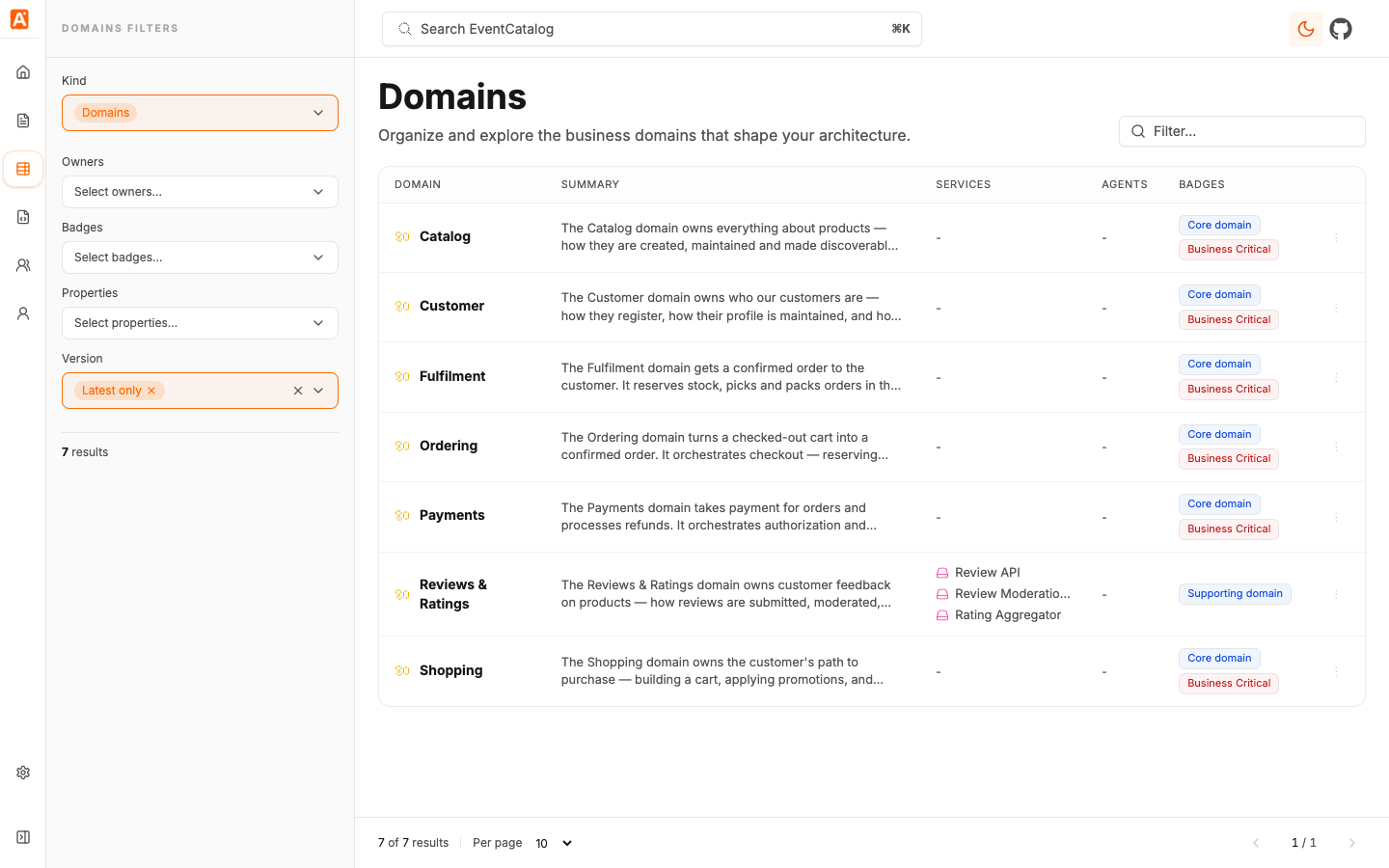
EventCatalog v4 replaces the resource-specific Browse sidebar links with a single Discover experience and a Kind filter. Users can switch between domains, systems, services, messages, flows, entities, data stores, and other resource collections from the Discover page.
What do I need to do?
If you use the default Application sidebar, there is nothing to change.
If you have custom screenshots, onboarding docs, or training material that mentions the old resource-specific Browse links, update them to reference Discover and the Kind filter.
Changed: System context maps are now the high-level architecture view
EventCatalog v4 adds dedicated system context map routes:
/visualiser/system-context-mapfor the global system context map./visualiser/systems/:id/:version/contextfor a single system in context./visualiser/domains/:id/:version/systems-contextfor systems inside a domain.
The existing resource visualiser routes still work for resources such as services and domains.
What do I need to do?
Update any custom links that should point users to the new high-level system context map.
New features
The following new features and improvements have been added to EventCatalog v4.
Systems are now a first-class resource
Systems are collections of resources that work together to perform a function, such as checkout, payment processing, customer identity, or product search.
A system can group the resources that cooperate to deliver one capability, including services, flows, entities, data stores, diagrams, and documentation.
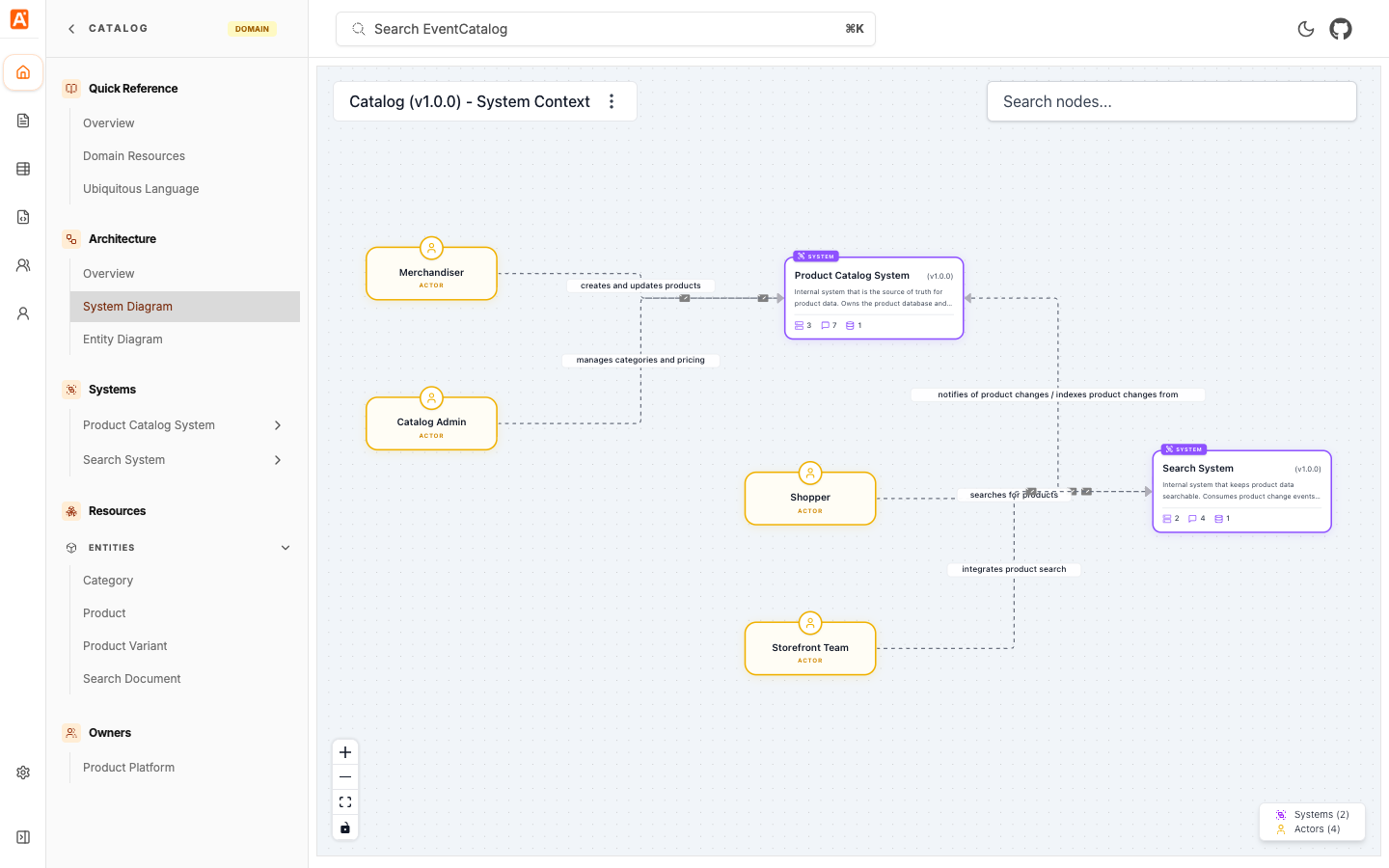
Systems are versioned resources. You can define them at the top level of your catalog, or inside a domain when that system clearly belongs to a business boundary.
Example system frontmatter:
---
id: payment-processing-system
name: Payment Processing System
version: 1.0.0
summary: Handles payment authorization, capture, and refund processing.
owners:
  - payments-platform
services:
  - id: PaymentAPI
flows:
  - id: CheckoutSaga
relationships:
  - id: fraud-detection
    version: 1.0.0
    label: requests fraud checks from
---
You can also reference systems from a domain:
---
id: payments
name: Payments
version: 1.0.0
systems:
  - id: payment-processing-system
    version: 1.0.0
---
Read more in the systems documentation.
System context maps
Systems can declare relationships to other systems. EventCatalog uses those relationships to render context maps that show how systems relate to each other.
System context maps help users move from a high-level architecture view into a detailed system view. From the global map, users can click into a system, then explore the services, APIs, messages, flows, entities, and data stores that make up that system.
Read more in the system context maps documentation.
Systems in the SDK
The EventCatalog SDK now supports systems. You can read and write systems, add resources to a system, write resources directly into a system, and add systems to domains.
This is useful for generators and integrations that sync architecture information from source code, specifications, schema registries, or internal platforms.
Systems in AI, MCP, and catalog tools
EventCatalog Assistant, MCP tools, and catalog tools now understand systems. AI workflows can retrieve systems, inspect system resources, and generate architecture diagrams for systems.
Systems in Discover, sidebars, teams, and ADRs
Systems are now available across the catalog experience:
- Systems can be discovered on
/discover/systems. - Systems appear in sidebars with their own icon and color.
- Teams and users can own systems.
- ADRs can target systems with
appliesTo: [{ type: 'system' }]. - Resource-level documentation can be attached to systems.
Top-level diagrams sidebar group
EventCatalog v4 adds a Top level diagrams navigation group when systems exist. This surfaces the System Context Map from the sidebar so users can start from the highest-level architecture view.
Custom homepages are available in Community Edition
Custom homepages are now available in Community Edition. You no longer need a paid feature flag to customize the catalog homepage.
Create your custom homepage at pages/homepage.astro.
Custom homepages can also embed the new System Context Map using the SystemContextMap component.
Known issues
Please check EventCatalog issues on GitHub for any reported issues, or to file an issue yourself.