Add systems to domains
eventcatalog@4.0A system is a collection of resources that work together to perform a function.
Adding systems to your domains helps users move from a business boundary to the software capabilities inside that boundary.
A domain describes the business area or bounded context. A system groups the resources that work together to deliver a capability, such as services, messages, APIs, data stores, flows, or agents.
Systems can live inside a domain folder or outside it. Add them to a domain when you want the domain page to show which systems belong to that business boundary.
Example domains and systems
For an e-commerce catalog, your domains might look like this:
| Domain | What it represents | Example systems |
|---|---|---|
Shopping | Browsing products, managing carts, and preparing checkout. | Product Discovery System, Cart System, Promotion System |
Ordering | Taking an order from checkout through fulfilment. | Checkout System, Order Management System, Fulfilment System |
Payments | Authorizing, capturing, refunding, and reconciling payments. | Payment Processing System, Fraud Review System, Refund System |
Customer | Customer identity, profiles, preferences, and communication settings. | Customer Profile System, Identity System, Notification Preferences System |
The domain gives users the business boundary. The systems show the software capabilities inside that boundary.
Recommended structure
When a system clearly belongs to a domain, keep it inside the domain folder.
This keeps the business model clear: the Shopping domain owns the Cart System and Promotion System.
Adding systems using frontmatter
To add systems to a domain, add a systems array to the domain frontmatter.
---
id: shopping
name: Shopping
version: 1.0.0
summary: |
  The Shopping domain owns the customer's path to purchase.
systems:
  - id: cart-system
    version: 1.0.0
  - id: promotion-system
    version: 1.0.0
---

## Overview

The Shopping domain is responsible for everything between browsing and buying.
The systems field tells EventCatalog which systems belong to the domain.
The version is optional. If no version is given, EventCatalog uses the latest version of the system.
Showing systems in context
You can add <ContextDiagram /> to the domain page to show the systems in that domain and how they relate to each other.
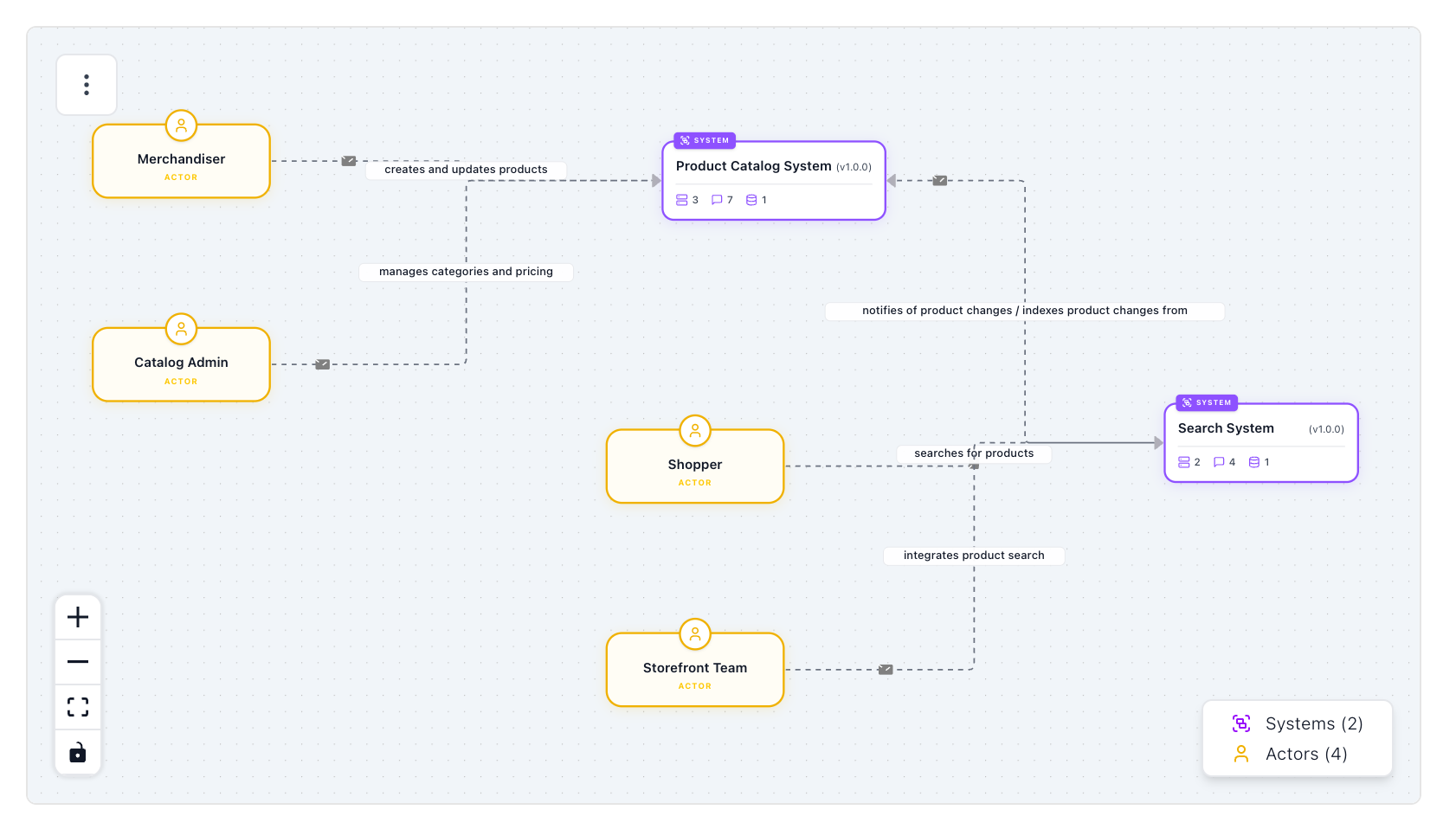
---
id: shopping
name: Shopping
version: 1.0.0
systems:
  - id: cart-system
  - id: promotion-system
---

## System context

<ContextDiagram />
Use this view when you want readers to understand the systems inside a domain before they drill into lower-level resources.
Linking to systems from domain docs
You can link to systems from domain Markdown using resource references.
The [[system|cart-system]] owns cart state and checkout.
If you want systems to act as entry points from the domain page, you can also use tiles or regular Markdown links.
When to add systems to a domain
Add systems to a domain when the system is part of that domain's business boundary.
For example:
ShoppingcontainsCart SystemandPromotion System.OrderingcontainsCheckout SystemandOrder Management System.CustomercontainsCustomer Management SystemandIdentity Provider.
If a system is shared across multiple domains, you can keep it outside the domain folder and still reference it from the domain frontmatter.
For the complete system fields and file structure, see the systems reference.