EventCatalog updates for January 2026
Welcome to the first EventCatalog update of 2026! EventCatalog turned 4 years old this month and we are excited to share what we have been working on.
We launched EventCatalog v3, introduced themes and dark mode, added data products as a first-class resource, shipped domain-level messaging, and released a built-in MCP server. Plus improvements to the visualizer, new CLI capabilities, and diagram resources.
In this post, we will get you up to speed on what shipped, and how to get started.
- EventCatalog v3
- Our next generation of EventCatalog
- Themes and Dark Mode
- Customize your catalog with built-in themes and dark mode
- Custom Tools for EventCatalog Assistant
- Bring your own models and tools to your documentation
- Embed IcePanel Diagrams
- Visualize your architecture with IcePanel diagrams
- Diagrams as First-Class Resources
- Bring your own diagrams to your documentation
- Domain-Level Messages
- Document messaging at the domain level
- Built-In MCP Server
- Query your architecture with MCP
- Data Products
- Document data products as a first-class resource
- EventCatalog CLI
- Manage your catalog with the CLI
- Visualizer Improvements
- Improve the visualizer with layout persistence and focus mode
EventCatalog v3
After 18 months of v2, we released EventCatalog v3.
The community has grown to over 1,200 members on Discord. We've shipped more than 70 releases and added features teams asked for. v3 refines EventCatalog for larger catalogs and more complex architectures.
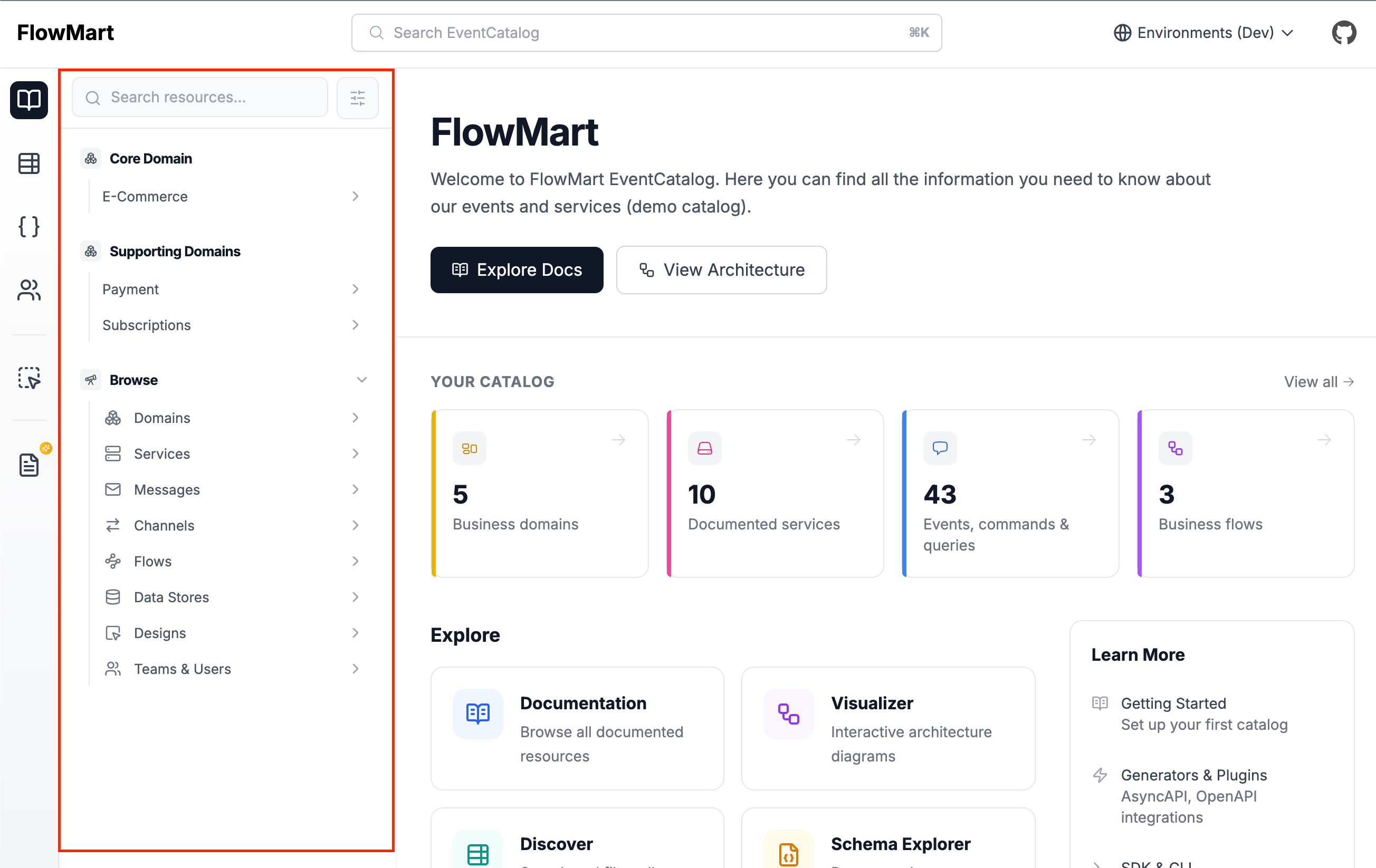
New context-aware navigation
The biggest change is the navigation system. The sidebar now adapts based on what you're viewing, showing relevant information and supporting drilldown exploration through domains, services, and messages. This can help your team find what they need faster.
You can customize the sidebar to exactly how you want it, and also favorite resources to quickly access them.
Performance improvements
We have made some performance improvements to EventCatalog, making it faster and more responsive.
Results: Faster page loads, instant search without build steps, and 100/100 Lighthouse scores on the demo catalog.
Simplified AI with EventCatalog Assistant
We have simplified the way AI can be integrated into your documentation which allows you to bring your own models and tools to your documentation.
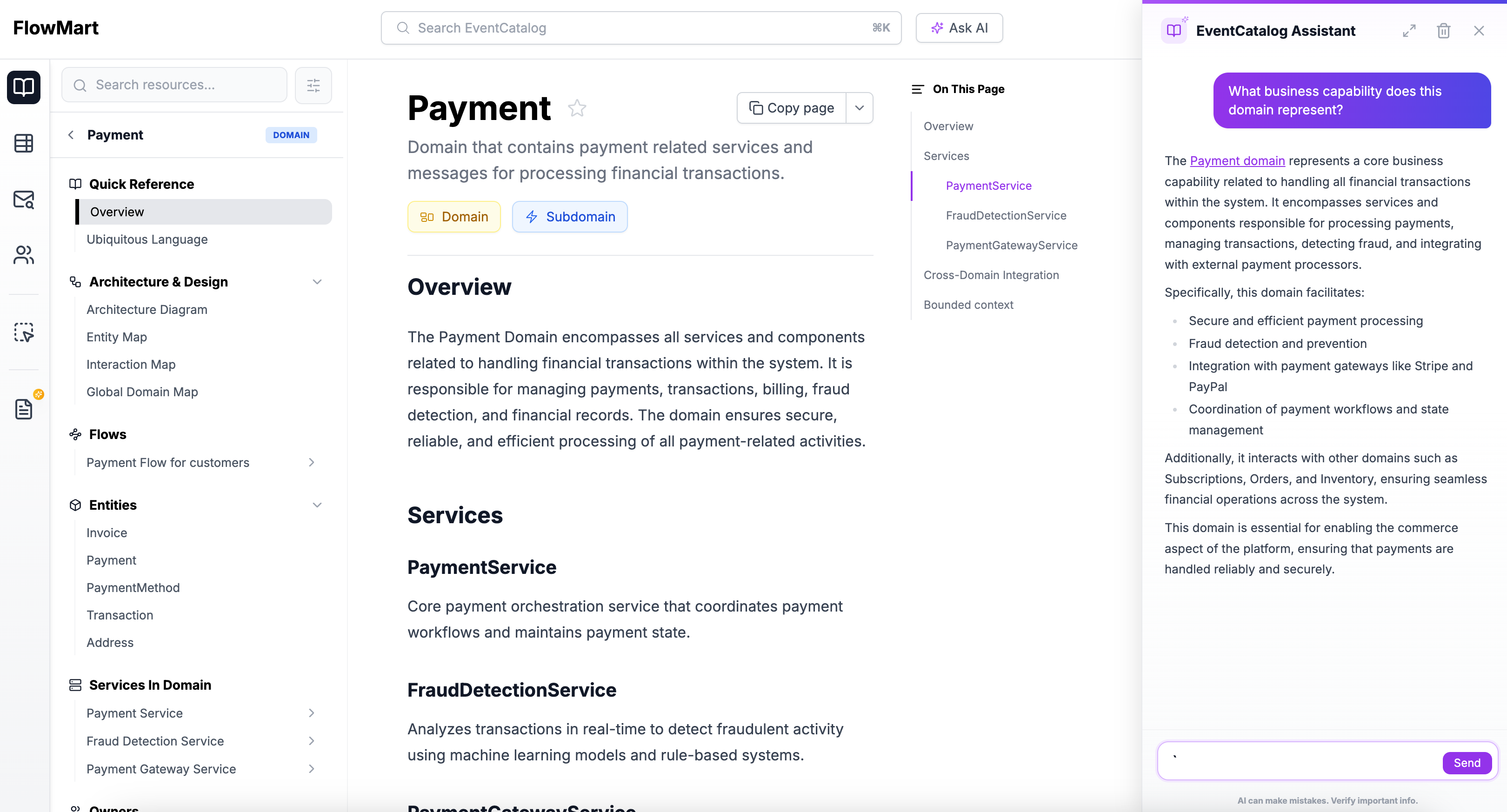
The new EventCatalog Assistant is simpler and more powerful. Bring any AI model you want (OpenAI, Anthropic, local models). Use custom tools for your integrations. One config file for AI settings. Context-aware conversations with your resources.
Every resource type has it's own question set when you load it into your assistant. Viewing an OpenAPI schema will give you questions about the schema, and you can also ask about the schema in natural language. If you are looking at your visualizations of your architecture you can ask questions about the nodes and how systems are connected.
To get started, you can follow the EventCatalog Assistant setup guide.
Store business workflows with services and domains
A highly requested feature: you can now assign flows (business workflows) to services and domains. Document business workflows, user journeys, and feature flows alongside your technical architecture.
---
id: Orders
flows:
  - id: checkout-flow
  - id: refund-flow
---
Read the v3 upgrade guide for full details on changes and migration steps.
Themes and Dark Mode
EventCatalog now supports themes and dark mode.
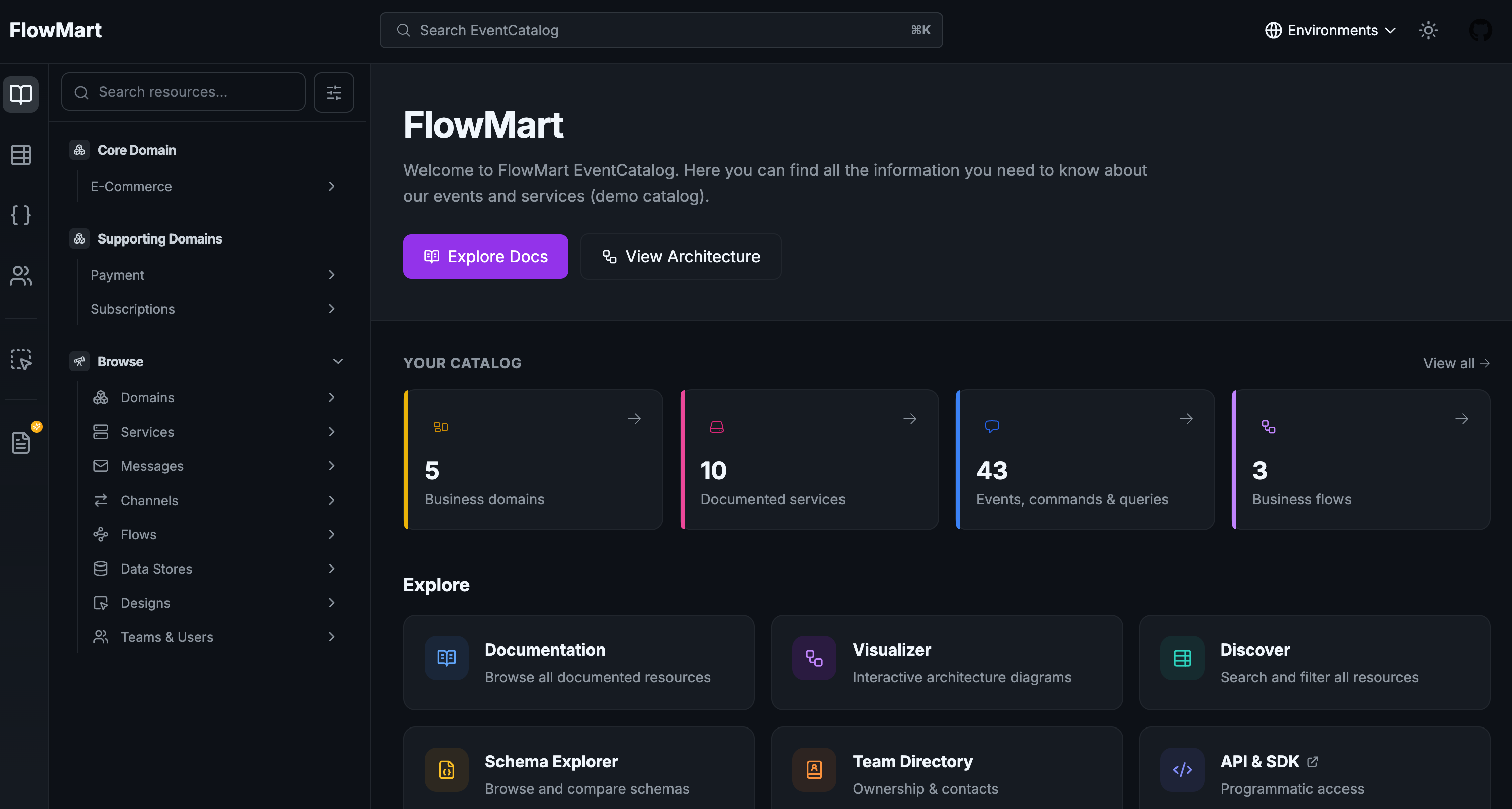
Dark mode automatically detects system preferences. Users can manually switch themes using the header toggle. Their choice persists across visits and syncs across tabs.
EventCatalog ships with five built-in themes: default (purple), ocean (teal), sapphire (blue), sunset (orange), and forest (dark green).
For complete brand control, create custom themes using CSS variables in eventcatalog.styles.css. Custom themes are available on Starter, Scale, and Enterprise plans.
export default {
  theme: 'sapphire',
};
Read the themes documentation for CSS variable references and examples.
Custom Tools for EventCatalog Assistant
Custom tools let you extend EventCatalog Assistant with your own integrations.
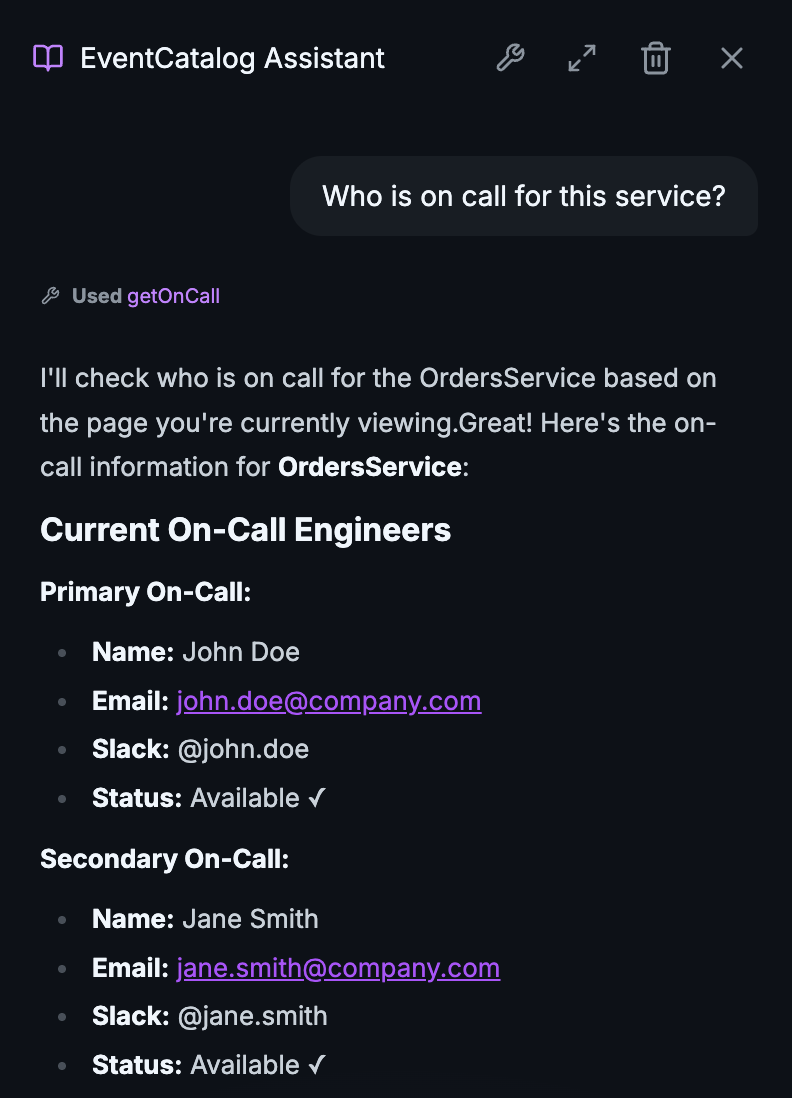 Calling custom tool to ask who is on call for a service
Your documentation is valuable, but it only tells part of the story. With custom tools, you can ask EventCatalog "Is OrderService healthy?" or "Who's on-call for PaymentService?" and get answers based on live data from your production systems.
Connect to any system you use: Datadog or Prometheus for metrics, PagerDuty or OpsGenie for on-call schedules, Kafka or RabbitMQ for queue depths. Your stack, your integrations, your data.
import { tool } from 'ai';
import { z } from 'zod';

export const tools = {
    getServiceHealth: tool({
        description: 'Get the current health status of a service.',
        inputSchema: z.object({
            serviceName: z.string(),
        }),
        execute: async ({ serviceName }) => {
            const health = await datadogClient.getServiceHealth(serviceName);
            return { status: health.status, uptime: health.uptime };
        },
    }),
};
Custom tools are available on Scale and Enterprise plans. Read the documentation for setup and examples.
Embed IcePanel Diagrams
IcePanel is a tool for visualizing software architecture using the C4 model. You can now embed IcePanel diagrams directly into EventCatalog.
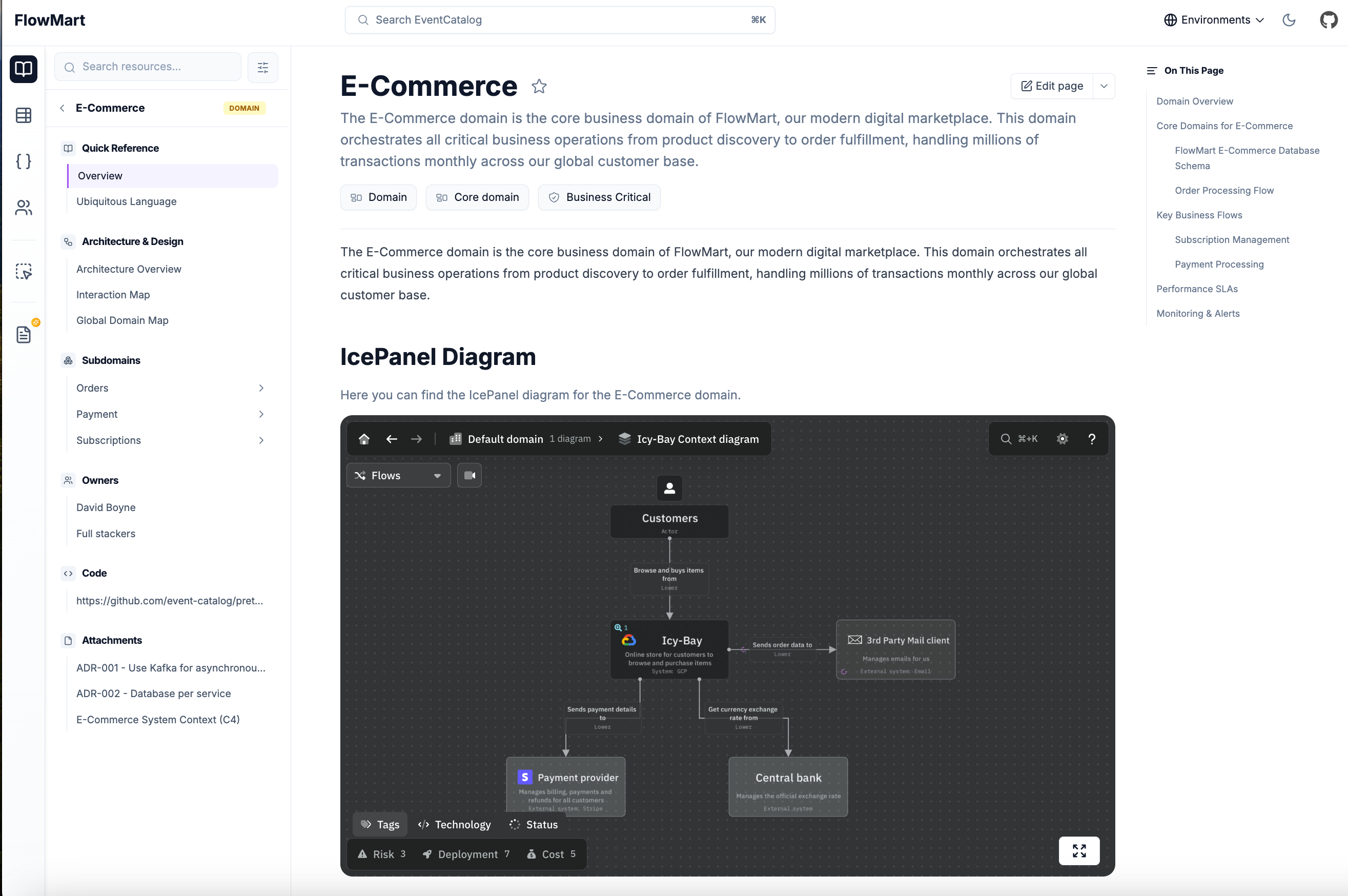 Embedding an IcePanel diagram in EventCatalog
Use the new <IcePanel /> component to embed interactive C4 diagrams into any page: domains, services, messages, or custom documentation.
<IcePanel
  url="https://s.icepanel.io/OpQVdslrqhZkyb/0QfB"
  title="System Context"
  description="High-level view of our ordering system."
  height="800"
/>
Each embedded diagram includes a full-screen button for exploring complex architectures without leaving EventCatalog.
Diagrams as First-Class Resources
EventCatalog 3.3.0 lets you bring custom diagrams to your documentation as first-class, versioned resources.
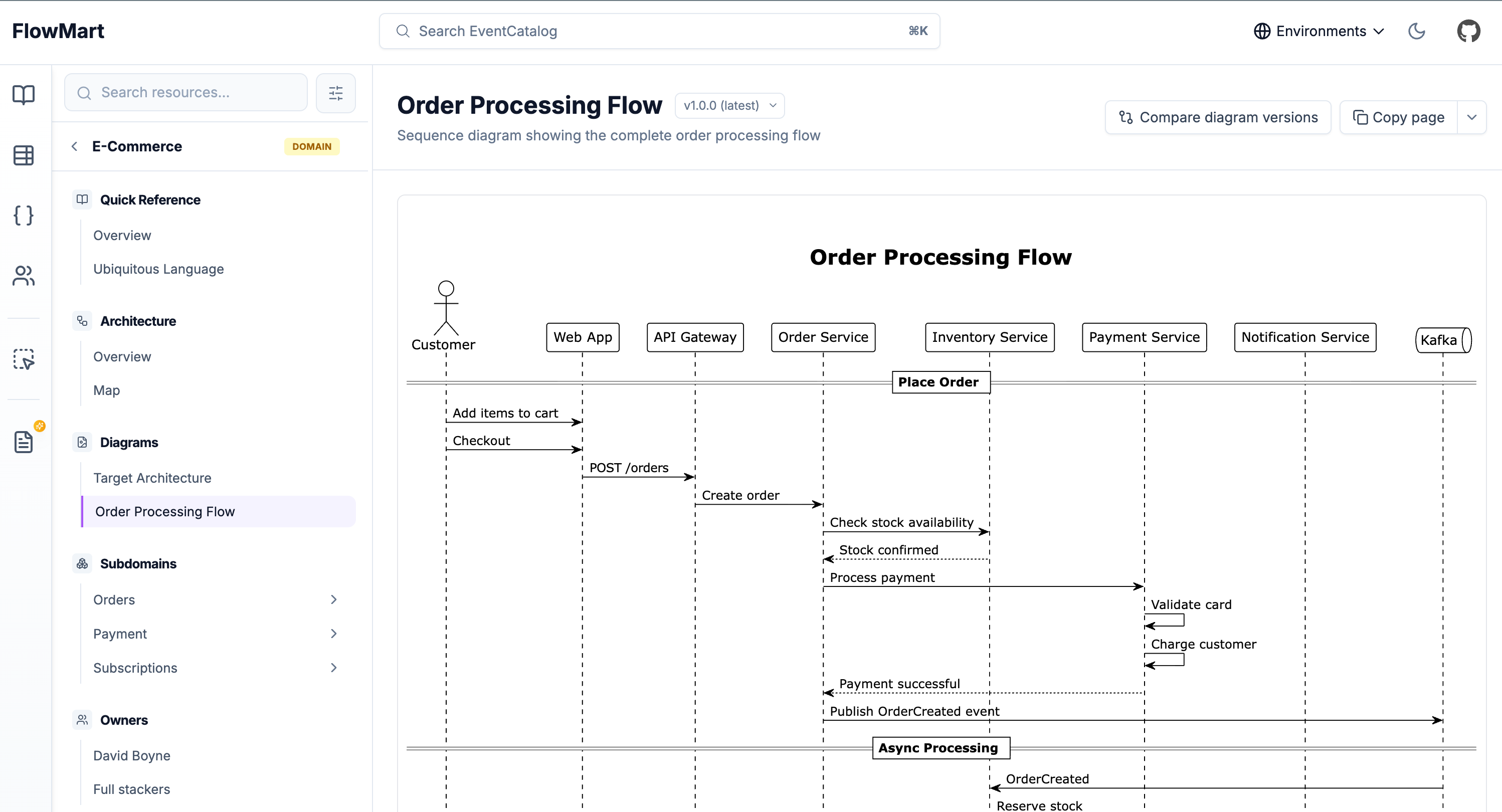 Example of PlantUML diagram
Your custom diagrams are now standalone resources with their own dedicated pages. Version them, link them to domains and services, and ask AI about them.
Features:
- Versioning: Track how your architecture evolves over time
- Version comparison: See what changed between versions (Scale)
- Cross-references: Link diagrams to domains, services, messages, and containers
- LLM support: Every diagram is accessible via
.mdxendpoints for AI tools - Interactive controls: Zoom, pan, and copy diagram code for better exploration
Create diagrams anywhere in your catalog. Put them at the root level for system-wide diagrams or nest them within domains and services.
# Root level
/diagrams/target-architecture/index.mdx

# Nested within a domain
/domains/Orders/diagrams/order-flow/index.mdx
Use code blocks for Mermaid or PlantUML, or use EventCatalog's built-in components like <Miro>, <IcePanel>, or <Lucid>.
Read the diagrams documentation for more details.
Domain-Level Messages
Domains in EventCatalog 3.7.0 can now directly specify which messages they send and receive.
If you practice Domain-Driven Design or think about messaging at the domain level, this update makes EventCatalog work the way you think.
---
id: E-Commerce
version: 1.0.0
sends:
  - id: OrderCreated
    version: 1.0.0
  - id: PaymentComplete
receives:
  - id: PaymentInitiated
  - id: FraudDetected
---
Domain messages appear in the sidebar under "Publishes Messages" and "Consumes Messages". You can mix approaches. Some domains use sends and receives. Some only have services that send and receive. Both work.
The EventCatalog SDK supports domain-level messages with addEventToDomain(), addCommandToDomain(), and addQueryToDomain().
Read the adding messages to domains guide for setup instructions.
Built-In MCP Server
Every EventCatalog instance now includes a built-in MCP server at /docs/mcp/.
The MCP server gives LLMs and MCP clients (Claude Desktop, Cursor, Windsurf, VS Code) direct access to your architecture documentation.
Ask questions about message schemas, trace service dependencies, or analyze change impact. The AI works with the same source of truth your team uses.
Example questions:
- "What's the blast radius if I change the OrderCreated event?"
- "Which services does the Payment team own?"
- "Show me the schema for UserRegistered"
- "Explain the checkout business flow"
The MCP server includes 15 tools for querying your architecture and 9 resources for bulk data access. It requires SSR mode and a Scale license.
Read the MCP server documentation for setup and API reference.
Data Products
EventCatalog 3.8.0 introduces data products as a first-class resource type.
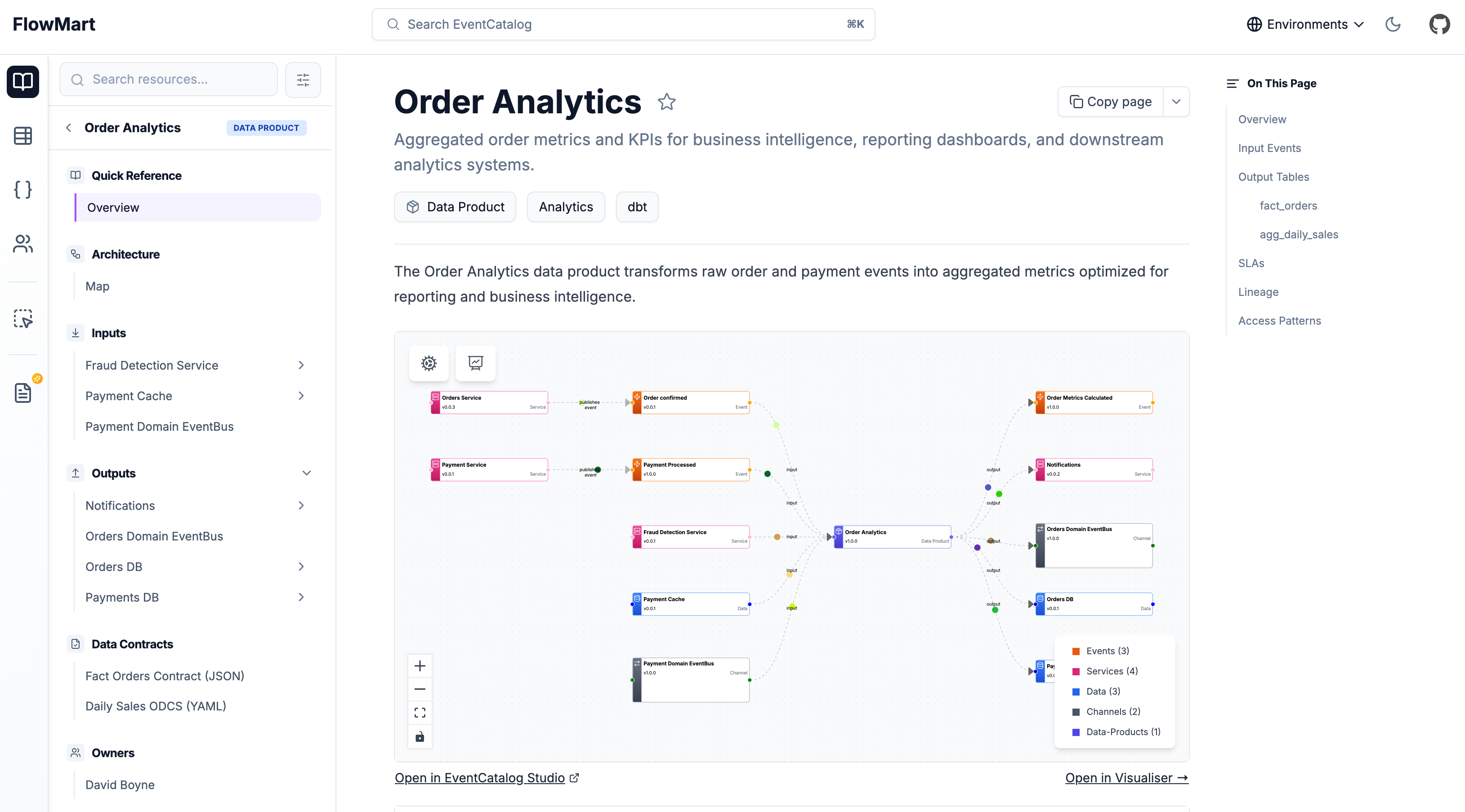
Data products transform raw events into analytics-ready tables. If your organization is building a data mesh or turning events into business metrics, you can now document those data products alongside your events, services, and domains.
Features:
- Inputs and Outputs: Document what goes into a data product and what comes out
- Contracts: Attach data contracts (JSON Schema, ODCS YAML) to outputs
- Versioning: Track how data products evolve over time
- Ownership: Assign teams and users as owners
- Relationships: Connect to services, containers, and events
import { writeDataProduct } from '@eventcatalog/sdk';

await writeDataProduct({
  id: 'order-analytics',
  name: 'Order Analytics',
  version: '1.0.0',
  inputs: [
    { id: 'OrderConfirmed' },
    { id: 'PaymentProcessed' }
  ],
  outputs: [
    {
      id: 'orders-db',
      contract: {
        path: 'fact-orders-contract.json',
        type: 'json-schema'
      }
    }
  ],
});
Data products integrate with all existing EventCatalog features: domains, sidebar navigation, discover page, node graphs, AI chat, MCP server, and schema explorer.
Data products are in beta. Read the data products documentation and share feedback on Discord.
EventCatalog CLI
The @eventcatalog/sdk package now includes a command-line interface. Every SDK operation works directly from the command line.
# Get an event
npx @eventcatalog/sdk --dir ./catalog getEvent "OrderCreated"

# Get all events
npx @eventcatalog/sdk --dir ./catalog getEvents

# Create a new event
npx @eventcatalog/sdk --dir ./catalog writeEvent '{
  "id":"OrderCreated",
  "version":"1.0.0",
  "markdown":"# Order Created"
}'
All output is JSON. Pipe it to jq, store it in environment variables, or use it in CI/CD pipelines.
Use cases:
- CI/CD integration: Validate events in your message broker match your catalog
- Automation scripts: Bulk update services or domains with bash scripts
- External system integration: Create draft events from monitoring tool webhooks
- DevOps workflows: Manage your catalog like infrastructure-as-code
Run npx @eventcatalog/sdk list to see all available functions.
Read the CLI documentation for detailed examples and API references.
Visualizer Improvements
Layout Persistence
You can now rearrange nodes in the visualizer and save those layouts for your team.
EventCatalog automatically arranges nodes when you add resources. Now you can drag nodes to custom positions, save the layout, and persist it for everyone.
Layouts are saved to _data/visualizer-layouts/ in your catalog. Commit them to git. Your team sees the same arrangement. When you add new resources, EventCatalog auto-positions them while keeping your saved positions for existing nodes.
This works in dev mode. Run npm run dev, drag nodes, open the settings menu, and click Save Layout.
Focus Mode
Focus Mode makes exploring complex diagrams easier. Click any node in the visualizer to see its connections in isolation.
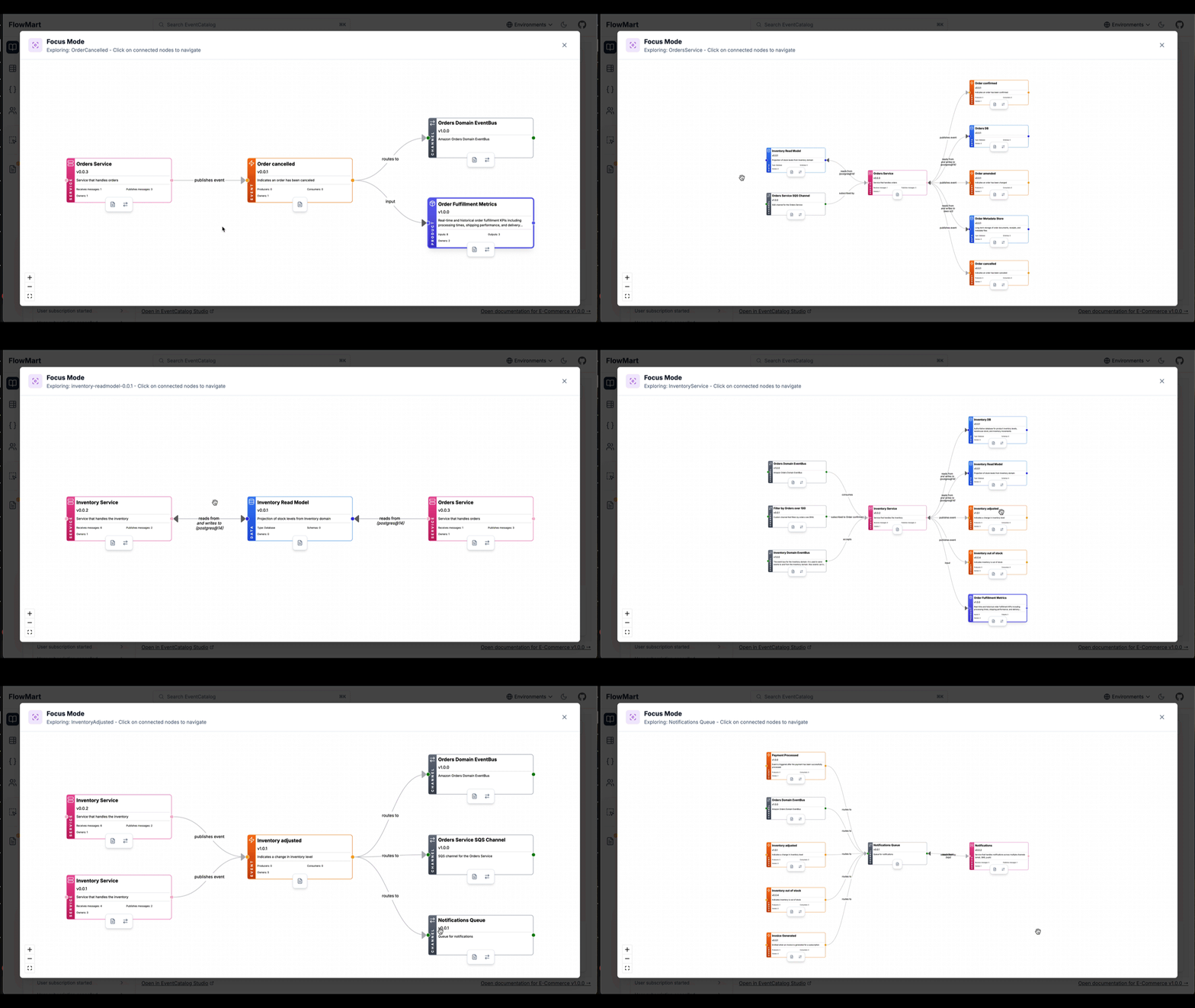
Focus Mode shows the clicked node in the center with incoming connections on the left and outgoing connections on the right. Click any connected node to navigate through your architecture's relationships.
This works across all visualizer types: services, domains, flows, entity maps, and designs.
Read the visualizer documentation for more details.
Summary
January 2026 was a milestone month for EventCatalog. The v3 release brings improved navigation, better performance, and a simpler AI experience. New features like data products, domain-level messaging, and diagram resources expand what you can document.
Visualizer improvements with layout persistence and focus mode give you more control over how your architecture is presented. The built-in MCP server and CLI open up new integration possibilities.
The project vision remains the same: bring discoverability to event-driven architectures and save teams time. EventCatalog continues to evolve based on community feedback and real-world usage patterns.
If you like EventCatalog, give us a star on GitHub. Join our Discord community of over 1,200 members to share feedback and connect with other users.
Thank you for being part of this journey.