100 posts tagged with "EventCatalog"

Explore EventCatalog articles and updates about EventCatalog.

View All Tags

Describe your architecture, and AI draws it live

· 9 min read

Last week we launched EventCatalog Studio (v2), live canvases inside your catalog for designing what comes next with your team.

A canvas is a good place to design, but you still have to draw on it. You know what you want to explore, whether that's adding buy now, pay later to checkout, splitting the Order Service, or seeing where the Payments domain might break. Most of the work is the drawing: finding the right services, dragging them on, connecting the right messages, and laying it all out. By the time it looks right, the meeting is over.

General-purpose AI tools don't help much here. They'll draw you boxes and arrows, but they don't know your architecture, so the services are made up and the names are wrong.

Today we're adding Draw with AI to EventCatalog Studio. Describe what you want to design, and the assistant draws it on a Studio canvas while you watch. It uses the services and messages in your catalog, and the AI model you choose.

Here's what it looks like. Type a request, and the assistant draws it:

Buy now, pay later at checkoutDraftDraw with AI

An empty canvas. Describe what to design, and the assistant draws it here.

Following EventCatalog AI

Introducing Architecture Fitness Functions for EventCatalog

· 10 min read

Your team agrees that services in the Ordering domain should never read from the Payments database. If Ordering needs to know about a payment, it listens for an event or calls the Payments API. You write it down, maybe in an ADR, and everyone nods.

Six months later, someone adds the Payments data store to the Order Service's readsFrom. It was the quickest way to get a feature out. The catalog now documents the dependency perfectly. It doesn't tell anyone that it breaks a decision you made.

That's the gap I keep seeing. Teams spend real time documenting their architecture and agreeing on how it should look, but nothing checks that it still does.

Architecture fitness functions close that gap. The idea comes from Building Evolutionary Architectures by Neal Ford, Rebecca Parsons and Patrick Kua: a fitness function is an automated check that tells you whether your architecture still meets a goal you set for it. Your architectural decisions stop being something people have to remember, and become something that passes or fails.

So we built them into EventCatalog. You can now write architecture fitness functions for your catalog: rules about your architecture, written in TypeScript, that run against your catalog and tell you which resources break them.

Share your architecture with anyone: export your catalog as one HTML file

· 9 min read

Every now and then, someone asks for "a copy of the architecture".

It's never the people who can already open your catalog. It's the partner integrating with your payments, the auditor who needs to know where personal data lives, the team at the company you just acquired, the contractor who is still waiting on VPN access. They need to understand part of your architecture, and they can't get to where it's documented.

So someone opens the catalog, takes twenty screenshots and pastes them into a doc. By next month it's out of date.

API teams sorted this out years ago: write an OpenAPI file, generate a reference from it, send it to anyone. I wanted the same thing for a whole architecture, and a few of you have asked for it too.

So we built it. You can now export your catalog as one HTML file: all of it, or just the part someone needs. Every domain, system, service, message and flow in it is linked to everything it relates to, and it's written again every time you build.

Introducing EventCatalog Studio (v2): design what comes next, together

· 9 min read

EventCatalog is good at telling you how your architecture works today. Your teams document their domains, services and messages, and everyone can find out what talks to what.

But the conversations that matter most are often about tomorrow. "How would we add buy now, pay later?" "What happens if we split the Order Service?" "Who needs to know if we retire this API?"

Those conversations usually happen somewhere else: a whiteboard, a slide, a diagram tool that knows nothing about your architecture. Someone redraws the services by hand, gets a few of them wrong, and the result ends up in a folder nobody opens again.

We kept hearing the same thing from customers: we document the present in EventCatalog, but we plan the future somewhere else.

Today we're excited to introduce EventCatalog Studio (v2): live, collaborative canvases inside your catalog, for designing what comes next with your team and your AI agents.

The first version of EventCatalog Studio was a separate tool for drawing designs with architecture primitives. Studio v2 lives inside EventCatalog itself, so your designs start from the architecture you already document, and your team and your agents can work on them together.

A Studio canvas called "Buy now, pay later at checkout", with Priya and Marcus on the canvas and Claude adding a new connection

See who owns every step of a flow

· 8 min read

A flow tells the story of a business process. A shopper checks out, the cart is priced, payment is authorized, the order is created, and the customer gets a confirmation.

Flows in EventCatalog have always been good at showing the steps. But once a team has the steps, the next questions are almost always about ownership:

  • Which teams are involved in this process?
  • Where does it cross from one domain into another?
  • Which systems have to work together for this to succeed?

Those questions matter because every boundary in a flow is a handoff. It's a contract between two teams, a dependency someone has to coordinate, and usually the place where things break. Until now, you had to work that out by clicking through each step.

In EventCatalog v5, you can group any flow by domain, system or team. You see the boundaries straight away, and you don't need to change a single line of your flows.

Your architecture diagrams, inside your agent

· 6 min read

Ask an AI tool how a service works and you get a wall of text.

"The Order Service accepts PlaceOrder, publishes OrderCreated and OrderCancelled, which are consumed by Fulfilment and Notifications, which..." By the third service, you are drawing the diagram in your head.

Some tools will draw one for you. But a diagram an AI model generates is a guess. It can look right and still be wrong, and you have no way to tell without checking it against the real thing.

You already have the real thing. Your catalog knows exactly how your services, messages and domains connect.

In EventCatalog v5, the MCP server can show your actual architecture diagrams and schemas inside the conversation. In Claude, ChatGPT, VS Code and other tools that support MCP Apps, you get the interactive EventCatalog visualiser right in the chat.

One diagram, three levels of detail

· 7 min read

Different people ask different questions of the same architecture.

A head of engineering wants to know which domains depend on each other. An architect wants to see the systems inside a domain and how they connect. An engineer about to change a service wants to see every message it sends and receives.

Until now, EventCatalog answered those questions with different pages. A domain had a System Diagram and a Resource Diagram. A system had a Context Diagram and a Resource Diagram. Services had a Data Dependency Graph, and there was a Domain Integration Map that most people never found. They were useful, but you had to know which one to open.

In EventCatalog v5, every domain and system has one diagram with three levels of detail. Start with the big picture, then zoom in until you can see the messages.

Introducing EventCatalog v5: One product, everything included

· 13 min read

EventCatalog started as an open source project. The idea was simple: document event-driven architectures in a way that doesn't go stale the week after someone draws the diagram. The community took it further than we ever expected. Today hundreds of organisations use it every month, from startups to banks, airlines and some of the biggest retailers in the world.

To make the project sustainable, we moved to an open-core model: the catalog free and open source, with paid plugins, integrations and enterprise features on top. It worked for a while, and it's the reason EventCatalog could become a full-time project. But AI is changing the ecosystem around EventCatalog, and the open-core model we have today no longer fits it.

So with EventCatalog v5, we're simplifying everything: one product, simpler pricing, and a new licence. EventCatalog stays free for individuals, open-source projects, education and organisations under $10M. Organisations above that pay by how many teams use the catalog, and every release becomes open source in the long run.

The short version
  • v5 is one product. Integrations, the MCP server, the assistant and SSO are included. Federation is free for organisations that qualify for Free Use. On a paid plan, federation is Enterprise only.
  • EventCatalog stays free for individuals, open-source projects, education, and organisations with under $10M in revenue and under $10M raised.
  • Larger organisations buy a licence priced by how many teams use the catalog, from $5,995 a year. No seats, no per-resource fees, and AI agents are included.
  • v4 stays MIT. Every v5 release becomes MIT four years after it ships.

EventCatalog 4.12: schemas your consumers can actually use

· 9 min read

When someone opens a schema in your catalog, they rarely stop at the schema.

They want to know how to publish the message. Who else is consuming it. Which business flow it is part of. What changed since the version they integrated against.

Until now, most of those answers lived somewhere else in the catalog, or in someone's head.

EventCatalog 4.12 turns every schema into a page your consumers can work from.

This release (along with 4.11, which shipped the first part of this work) brings:

  • A richer schema page: tabs for examples, producers and consumers, flows, versions, and details, all linkable.
  • Written usage examples: explain how to use a message, with code in several languages, right next to the schema.
  • Two new components: <Columns /> and <CodeGroup />, for any page in your catalog.
  • No more .eventcatalog-core folder: EventCatalog now runs directly inside your project.
  • Custom pages that match the rest of your catalog, and the assistant upgraded to AI SDK v7.

Whats new in EventCatalog - August 2026

· 11 min read
David Boyne
Founder of EventCatalog

Welcome to the monthly update for EventCatalog. In July we released EventCatalog v4 and introduced systems as a new way to document software architecture. In August we focused on what happens when that architecture grows across teams, repositories, and thousands of resources.

The headline is EventCatalog Federation v2, a new built-in workflow for composing team-owned catalogs into one verified organization catalog. We also shipped a catalog-wide Architecture Graph, custom sidebars for every resource, a major upgrade to the EventCatalog Linter, and plenty of improvements underneath.

We started the month on 4.3.4 and finished on 4.10.3.

EventCatalog Federation v2​

EventCatalog works well as a central catalog, but large organizations often want teams to own their architecture documentation next to their code while still giving everyone one place to explore the wider system.

In August we released EventCatalog Federation v2.

Federation is now built into EventCatalog. An organization catalog lists the team catalogs it wants to compose, then one command fetches those sources, validates ownership and relationships across them, and materializes a connected view for people and AI agents.

eventcatalog.config.js
export default {
federation: {
sources: [
{ id: 'acme/payments', source: 'github:acme/payments-catalog' },
{ id: 'acme/orders', source: 'github:acme/orders-catalog' },
{ id: 'acme/fulfillment', source: 'file:../fulfillment-catalog' },
],
},
};

Then run:

npx eventcatalog federate

The important change from the first version is the contract. Federation v1 cloned repositories and copied configured directories. Federation v2 indexes catalogs and resolves their architecture graph. Teams reference resources owned by other teams instead of copying them, and collisions fail closed instead of being hidden by last-write-wins behavior.

Read the EventCatalog Federation docs

Each run also writes an eventcatalog.lock file with the resolved source state, uses a content-addressed cache, and restores the previous output if a run fails. Diagnostics for duplicate ownership, missing resources, unresolved versions, type conflicts, and asset collisions can be configured as off, warn, or error.

Federation can pull from GitHub or local folders, which means you can test the whole workflow on your machine before wiring it into CI. Team-owned custom components and public assets can come across too, while central catalog components still take precedence.

This is the first working version of the new model and we are looking for feedback. You can read more in the Federation v2 announcement or follow the Federation guide to try it.

See your whole architecture as a graph​

Systems and context maps give you deliberate, curated views of an architecture. Sometimes you need the opposite: one map that starts with everything and lets you explore from there.

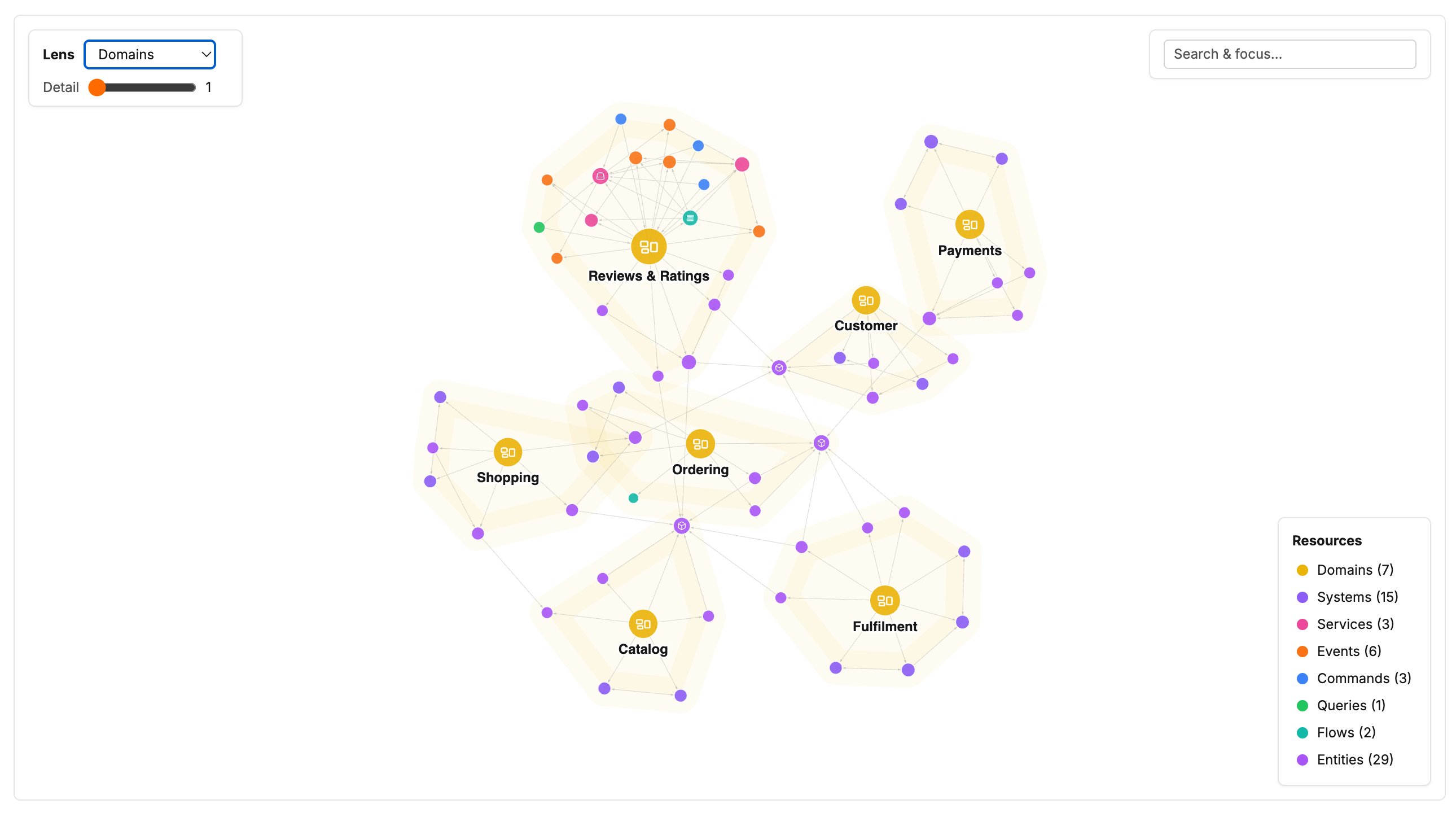
EventCatalog 4.5.0 introduced the new Architecture Graph, a catalog-wide force-directed graph of your domains, systems, services, agents, messages, flows, entities, containers, data products, teams, and the relationships between them.

You can search for any resource, click it to focus on its neighbourhood, change how many hops you want to see, and switch lenses to group the graph around domains, systems, owners, or resource types. Double-clicking a node opens its documentation.

The graph renders to a single canvas and keeps its wire format compact, so it is designed to stay responsive even when a catalog contains thousands of resources. It is opt-in while in beta:

eventcatalog.config.js
export default {
visualiser: {
architectureGraph: {
enabled: true,
},
},
};

At the end of the month we also added the <ArchitectureGraph/> component, so you can embed a focused view directly into a domain, system, service, message, or custom documentation page.

<ArchitectureGraph depth="3" lens="messages" />

The embedded graph starts from the resource being documented. Readers can explore locally, then open the same state full screen when they need more room. The component works even if the full-page graph is not enabled.

Build a sidebar around your readers​

Generated resource sidebars are useful because they stay up to date automatically. But the most useful order for EventCatalog is not always the most useful order for your readers.

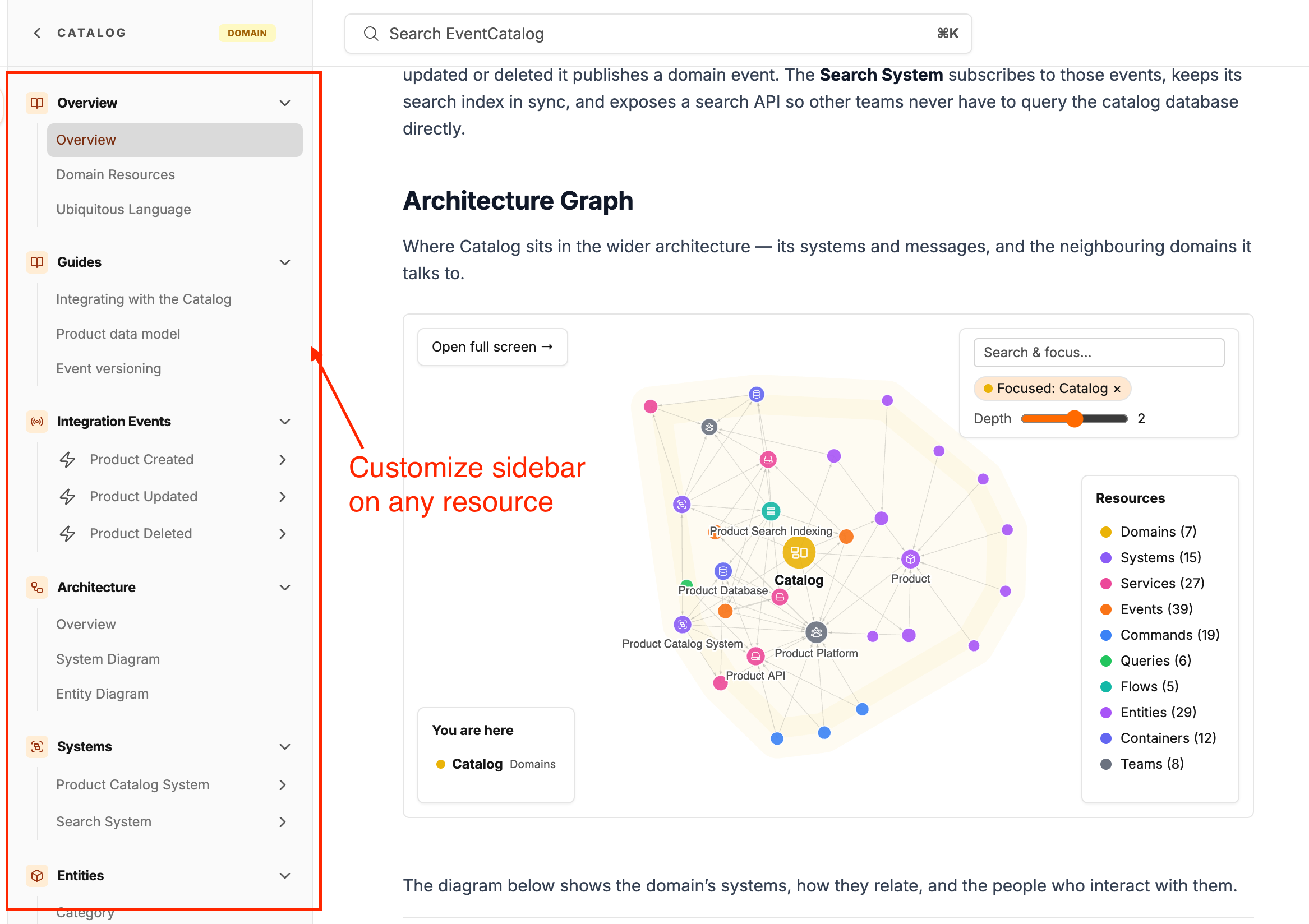
EventCatalog 4.10.0 adds custom resource sidebars. Add a sidebar.json next to any resource's index.mdx and you can define the navigation for that resource yourself.

domains/Payments/sidebar.json
{
"sections": [
{ "section": "$quick-reference", "title": "Start here" },
{
"title": "Guides",
"pages": ["[[doc|guides/onboarding]]"]
},
{ "section": "$services", "title": "APIs and workers" },
{ "section": "$domain-events", "title": "Integration contracts" },
{ "section": "$decision-records", "collapsed": true }
]
}

The $sections remain live as your catalog changes, while custom groups can mix documentation, specifications, schemas, resource references, and normal links. Groups can be nested or collapsed, and versioned resources inherit the sidebar from the resource folder unless they define their own.

If a token, document, specification, or schema cannot be resolved, the build fails with the file and valid options. That makes a custom sidebar safe to maintain rather than another navigation file that silently drifts.

A much stronger EventCatalog Linter​

The EventCatalog Linter received one of its largest upgrades so far in August.

New rules now catch unknown frontmatter fields, unrecognised Markdown files, and file references that point at missing schemas, specifications, data product contracts, or public icons. Misspelled fields include suggestions, and x- custom properties continue to work as expected.

Findings now include the exact line and column, version ranges behave the same way as EventCatalog core, and missing resources are reported separately from references to versions that do not exist.

npx @eventcatalog/linter --init

The new --init command creates a fully commented .eventcatalogrc.js with every rule and its default severity. We also added --quiet, --max-warnings, and --no-color, fixed the checked-file summary, and made CI output quieter and easier to scan.

Channel maps​

Channels now have their own architecture maps.

A big thank you to Jonas Lagoni, who contributed this feature in #2756.

A channel map shows the producers and messages that publish into the channel, the services and agents that consume from it, and the channels it routes to or receives routes from. Routed chains remain connected all the way through, so you can follow how a message enters one channel and reaches a consumer through another.

You can add <NodeGraph /> to a channel page, or open the Architecture → Map link in its sidebar when the visualiser is enabled.

EventCatalog Scale now supports monthly subscriptions​

EventCatalog Scale is now available month-to-month alongside annual billing, giving teams more flexibility to get started and cancel at any time.

Other project improvements​

  • Customizable sidebars for any resource using sidebar.json (#2832)
  • New <ArchitectureGraph/> component for resource and custom documentation pages (#2834)
  • New linter rules, line and column reporting, accurate summaries, and --init configuration scaffolding (#2831)
  • Support for V1, V2, and other V-prefixed integer resource versions across lookup, comparison, federation, and snapshots (#2815)
  • Ubiquitous language terms now support edit URLs and appear in indexed search (#2820, #2802)
  • Domain resource pages now include every directly attached resource, including subdomains, systems, agents, and data products (#2769)
  • AsyncAPI parser errors now render on the page instead of leaving a blank screen (#2777)
  • AsyncAPI generator now preserves shared references when saving parsed specification files (#445)
  • OpenAPI and AsyncAPI generators now escape angle brackets in descriptions so generated MDX continues to build (#447)
  • Historical message versions now show their version-specific producers and consumers (#2787, #2805)
  • Fixed container context-menu links opening entity URLs instead of container URLs (#2804, #2809)
  • Fixed a Windows development-server crash caused by backslashes in watched project paths (#2806)
  • Fixed LikeC4 diagrams in Vite development mode (#2823)
  • Fixed domain-owned entities appearing as external resources in entity maps (#2825)
  • Fixed embedded Architecture Graphs in static builds and missing domain System Diagram pages (#2839)
  • Updated vulnerable dependencies and bumped Astro and its integrations through 7.2.8 (#2771, #2818)

Thanks​

Thanks to everyone who contributed to EventCatalog this month by opening issues, reporting bugs, and suggesting features, including Jonas Lagoni, Lucas Chabalier, Alex Dunne, Xavier Gouley, Ondrej Musil, and many more.

The detailed reports and fixes from the community helped us make the new v4 foundation more reliable while we kept building on it.

What's coming in September?​

A few things we're working on:

  • Notifications for breaking changes
  • Better ways to capture breaking changes
  • Improvements to our Code-to-Docs workflows
  • Introducing community calls for EventCatalog

If you have any questions or want to join our community exploring EventCatalog and event-driven architecture feel free to join us!

Until next time!, Dave

Introducing EventCatalog Federation v2

· 7 min read

EventCatalog already works as a central catalog. Plenty of teams keep architecture, services, and messages in one place, and that is a good way to run it.

Federation is EventCatalog at scale. Once you have that central catalog, some organizations want to go further. They want distributed documentation: teams own their own docs, and the organization still gets one catalog it can trust.

Teams keep owning their services, their information, their architecture decision records, and everything else, next to their code. They federate that into a central catalog. People keep working autonomously. The organization still gets a catalog that updates itself from what teams already write.

Today, I am happy to announce EventCatalog Federation v2.

Federation is now built into EventCatalog. It is composition: distributed catalogs, composed into a central view. Catalogs stay with the teams that own the work. The organization catalog lists those sources, validates ownership and relationships, and materializes one connected view for humans and agents.

Schema registry vs Architecture Catalog

· 7 min read

A schema registry stores the contract: the shape of an event or message. An architecture catalog tells you how that contract fits the system: who produces it, who consumes it, which domain it belongs to, and what else breaks if you change it.

You often want both. A registry without a catalog is a drawer of schemas with no map. A catalog without schemas is a map with no contracts.

A schema registry shown as a filing cabinet of JSON Schema, Avro, and Protobuf files, versus an architecture catalog shown as a map of services around an OrderCreated eventA schema registry files the contract. An architecture catalog maps how that contract is used.